EZM - Social Platforms

Choosing the Right Social Media Platforms for Your Business

Diving into the realm of social media marketing can be a daunting task, but with over 3.4 billion active social media users worldwide, it’s now a necessity for most businesses to include in their marketing strategy. From Facebook to LinkedIn to Pinterest, each social network has its own uses when it comes to promoting your business online. The main question you may be asking yourself is, “Which social media platforms are best for my business?”

Read more

Facebook Ad Targeting: What Do All These Changes Mean to You?

If you’ve been following the news recently, you’re probably aware that Facebook has been in a bit of trouble. Various scandals and investigations have exposed issues surrounding Facebook’s advertising targeting options and data privacy.

In response, Facebook has made a flurry of changes to their advertising options over the past year. Recent headlines are full of alarming news about the social media platform removing thousands of ad targeting options, but what does that really mean for your business?

First, let’s get to the bottom of how Facebook gets its targeting data, and why they’re making these changes in the first place.

Where Does Facebook’s Targeting Data Come From?

Facebook is known for having the most detailed targeting options of any online advertising platform. Especially when it comes to user interests and behaviors, Facebook’s targeting can be so detailed, it’s creepy.

Where does all this information come from?

Information from your use of Facebook

With over 2 billion daily active users who are reportedly spending upwards of 58 minutes per day on the app, Facebook gets a ton of information directly from us, their users. First, you probably share information on your profile like your age, gender, job, hometown, and friends. Facebook also tracks all your interactions with posts and pages, including what you post, click on, Like, or Share.

Information from advertisers

As a business, you probably have some information about your customers already, including things like their email addresses. If you want to reach those people on Facebook, you can upload your data, and Facebook will find accounts that match (without telling you exactly who matched). You get a targeted ad campaign, and Facebook gets even more data about its users that you provide.

Information from websites and apps that use Facebook services

Facebook can collect information about you even if you’re not on Facebook itself. Have you ever seen a Like or Share button on another website, or a blog (like this one?) Or maybe you’re signing up for a new software service, and you see a “Login with Facebook” option? Tools like that send data back to Facebook about your actions around the web.

Beyond that, businesses that advertise on Facebook often put a Facebook Pixel on their websites, which tells Facebook what pages you’re looking at on that website. For example, if an online retailer uses a Facebook Pixel, Facebook could tell if you looked at a particular shirt, or put a pair of shoes in your shopping cart.

Information from third-party data companies (discontinued)

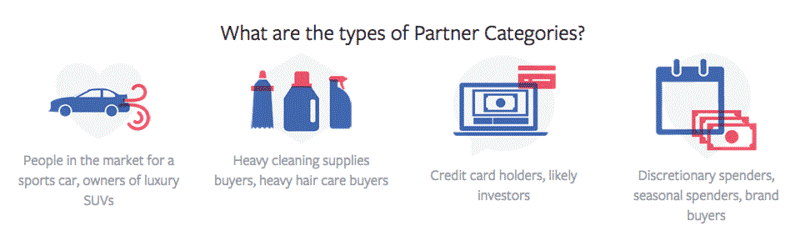
Back in 2012, Facebook announced Partner Categories – targeting options enabled through partnerships with third-party data brokers like Acxiom, Experian, and Oracle Data Cloud. These Partner Categories provided enormous amounts of information on user behaviors beyond Facebook, such as purchase history, home ownership, or income level.

In the wake of growing criticism, Facebook announced in May of 2018 that they are shutting down Partner Categories.
types-of-partner-categories

Source: marketingland.com

A Brief Timeline of Recent Facebook Ad Targeting Changes

So why is Facebook making changes to their advertising options in the first place?

Between various scandals and CEO Mark Zuckerberg testifying in front of Congress, Facebook’s data privacy and advertising practices have been under close scrutiny over the past couple years. We’ve assembled a brief timeline to explain the key controversies surrounding Facebook, and the major changes they’ve made to their ad targeting in response.

October 2016 – ProPublica reveals discriminatory housing ads & HUD initiates investigation

ProPublica, a nonprofit investigative journalism group, found that Facebook allowed advertisers to create ads that excluded users based on race, which goes against the federal Fair Housing Act. This prompted the U.S. Department of Housing & Urban Development to begin a preliminary investigation of Facebook’s advertising and targeting options.

November 2016 – Facebook announces updates to Ethnic Affinity Marketing

In response to the ProPublica report, Facebook announced that it was disabling Ethic Affinity categories for housing, employment, or credit-related ads. They also promised to update their advertising policies and provide more education to help advertisers in these categories avoid discriminatory ads.

February 2017 – Facebook announces improvements to anti-discrimination advertising policies

Following up on their earlier promises, Facebook soon announced stronger enforcement of diversity practices, including algorithms to disapprove potentially discriminatory ads, and required self-certification for advertisers in housing, employment or credit categories.

September 2017 – ProPublica reveals anti-Semitic Facebook ads

A few months later, ProPublica published another article, this time revealing that Facebook allowed anti-Semitic ads based on topics like “Jew hater,” and “How to burn Jews.” These ad categories were likely automatically generated by Facebook, based on information that people listed on their profiles.

facebook-anti-Semitic-ad-397822-edited

September 2017 – Facebook removes over 3 million self-reported fields from ad targeting

Because offensive ad categories were created from information on users’ profiles, Facebook removed more than 3 million self-reported terms from ad targeting. These included fields like school, field of study, employer, and job title.

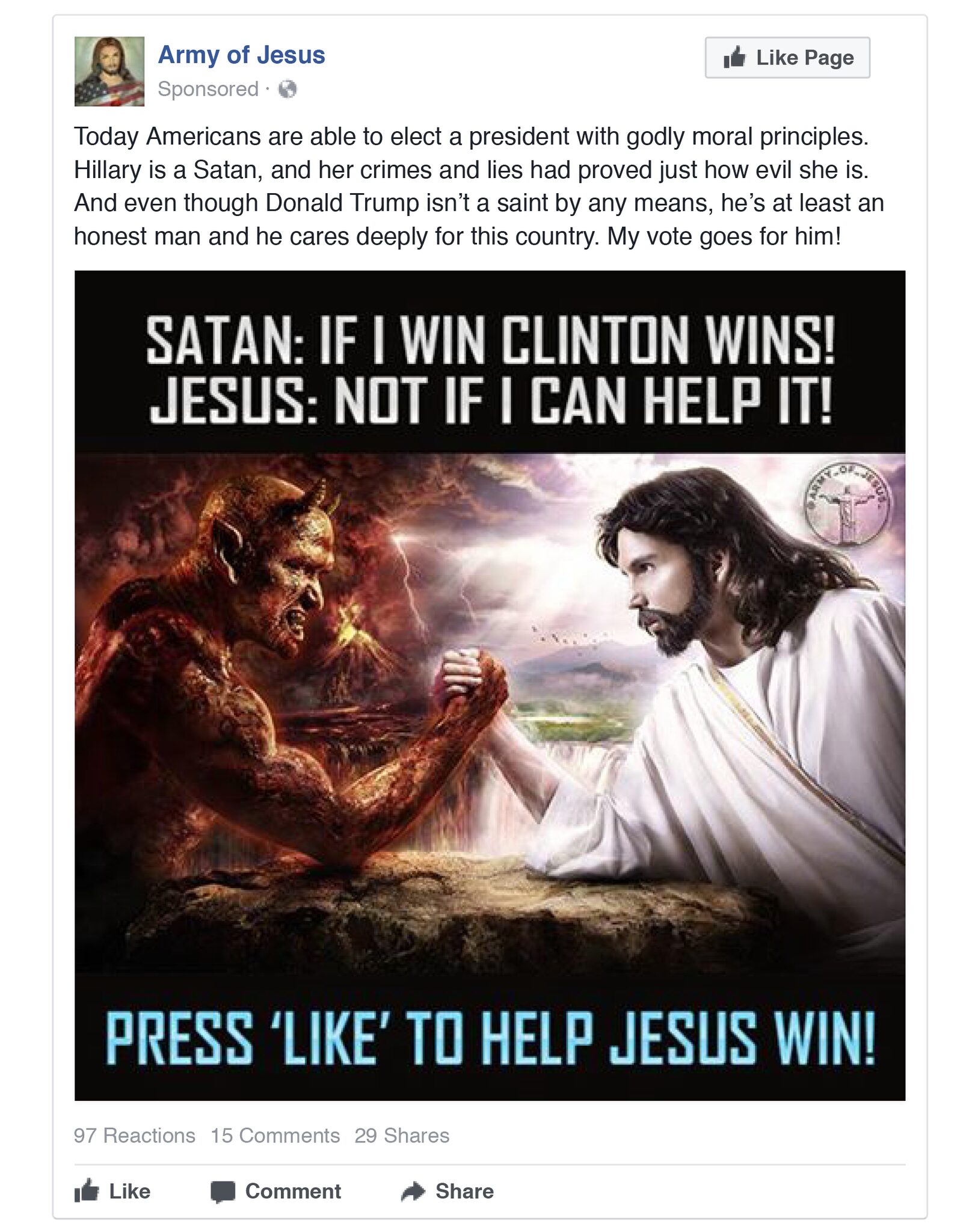
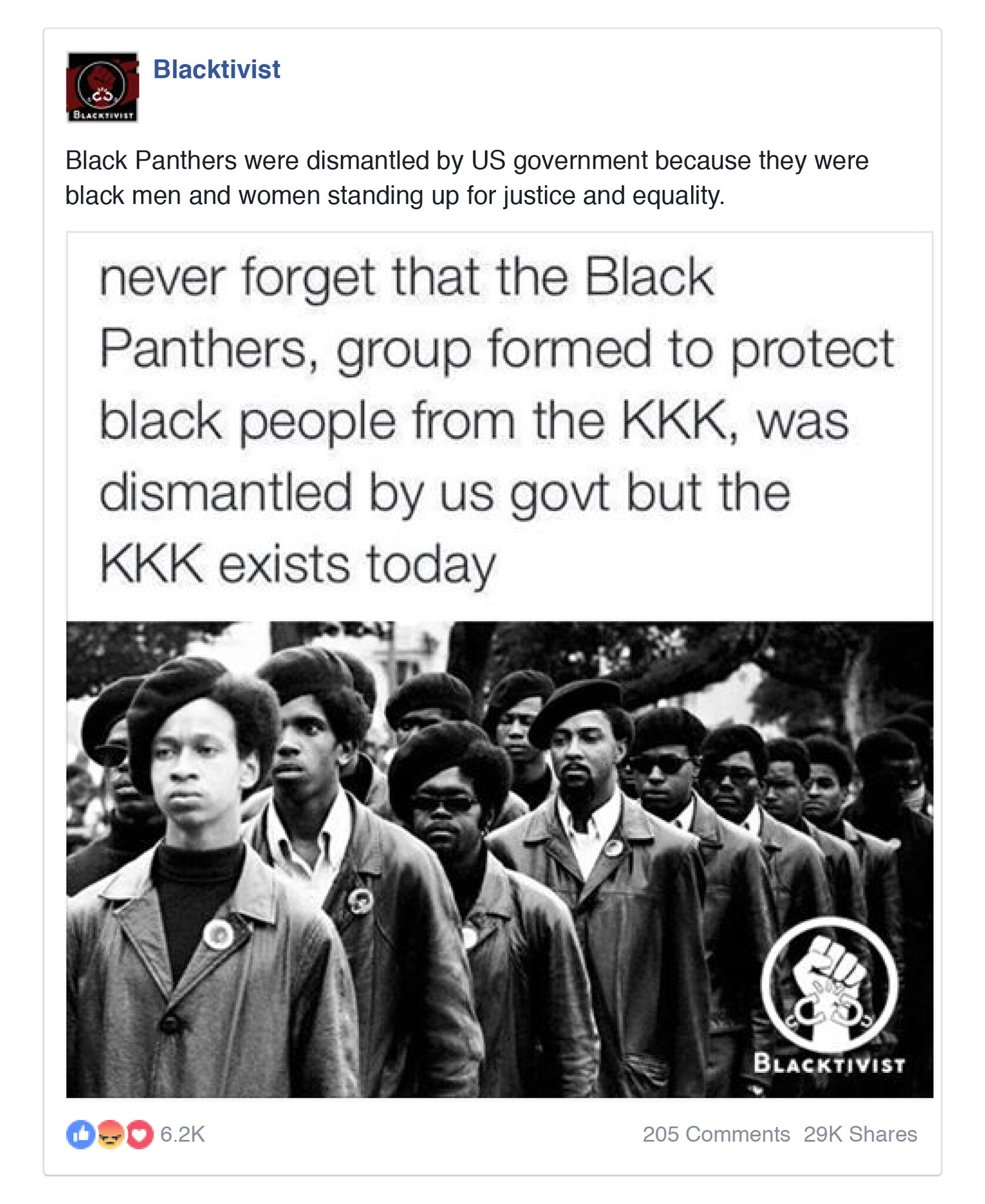
November 2017 – Russian ads from 2016 U.S. election come to light

During their investigation of Russian influence in the 2016 presidential elections, Congress found that Russia-based advertisers had purchased political ads to polarize American voters.
Russian-ads-Clinton-Satan-Russian-ads-blacktivist-KKK

March 2018 – Cambridge Analytica scandal sparks massive Facebook investigation

Amidst investigations of the 2016 elections, reports surfaced that Cambridge Analytica, a political data firm hired by the Trump campaign, gained access to personally identifiable information for more than 87 million Facebook users. This sparked public outcry and raised issues about Facebook’s data collection and privacy.

March 2018 – Facebook announces it is shutting down Partner Categories

In the wake of Cambridge Analytica, Facebook announced that they were shutting down Partner Categories. While not directly involved in the scandal, Partner Categories gave Facebook access to a huge amount of behavioral data, which could be seen as creepy or downright invasive of user privacy.

April 2018 – Mark Zuckerberg testifies before Congress

With all the scandals going on, CEO Mark Zuckerberg was called to testify before Congress. During his testimony, he re-affirmed the importance of privacy, and took responsibility for the misuse of Facebook tools for “fake news, foreign interference in elections, and hate speech, as well as developers and data privacy.”

April 2018 – Facebook announces removal of “thousands of targeting options”

Next, Facebook announced that they were reviewing their ad targeting options to keep advertising “safe and civil.” The result: removing thousands of targeting options, primarily exclusions related to race, ethnicity, sexual orientation, and religion.

August 2018 – Facebook Developer blog announces reinstatement of professional targeting options

While Facebook’s official newsroom generally gets the media’s attention, their developer blog sometimes flies under the radar. In early August, the blog announced reinstated professional targeting options for job titles, employers, field of study, and education, as well as a new category for Facebook Page Admins.

August 2018 – HUD files official complaint and Facebook removes 5,000 targeting terms

Most recently, the Department of Housing and Urban Development filed an official complaint against Facebook, claiming discriminatory ad options violate the Fair Housing Act. This is the result of the same investigation that ProPublica sparked in 2016. In response, Facebook announced that they are removing over 5,000 targeting options.

So What’s Changed?

Many of Facebook’s announcements have been pretty vague about exactly what ad targeting options they’re removing. Plus, it takes time for them to roll-out major updates, so many of these changes are still in process.

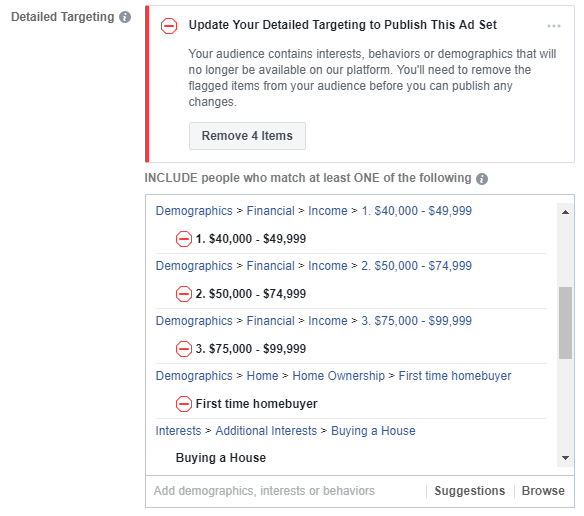
However, Facebook is now flagging discontinued targeting options and requiring users to change them before ads can continue to run.
Facebook-flagging-targeting-options_2

Here’s a list of some of the major targeting options that Facebook has changed or removed:

Demographics

  • Limited options for Field of Study and Schools
  • Financial categories (ex. Income, Net Worth)
  • Home categories (ex. Home Ownership, Home Types, Home value)
  • Generation
  • Interested In

Third party behavioral data from Partner Categories

  • Retail purchasing behavior (ex. frequent electronics or cosmetics buyers)
  • Automotive shoppers (ex. people shopping for a new vehicle, or luxury car buyers)
  • Charitable donations
  • Business travelers
  • Company size
  • Likely to move, or in the market for a house

Job Titles

  • Currently, options are limited for job titles
  • You can’t target company executives like CEOs or Presidents

Exclusions based on gender, race, religion etc.

  • Gender and ethnic affinity categories are still available for targeting, but you can’t exclude them
  • For example, you can target women, but you can’t exclude men

What Do These Ad Targeting Changes Mean?

1. Don’t Panic

Despite all the doom and gloom headlines, Facebook still has an enormous amount of information about its users. Again, people spend a ton of time on Facebook (and Instagram). Think about how all your posts, clicks, comments, messages, groups, friends, and more. How much do they say about you and your interests? Probably a lot.

Don’t believe it? You can actually view and download all of your Facebook data, so you can see just how much Facebook knows about you. It’s a little scary, but remember that you can adjust your privacy settings.

So yes, targeting options are changing, but at the end of the day, Facebook still has plenty of data for advertisers to focus in on a specific audience.

2. Review and update any current ads

Some of these ad changes were announced months ago, but they’re still rolling out. So if you’re actively using Facebook advertising, review your current ads to make sure your targeting options are still valid.

Facebook has gradually been removing discontinued options from campaign creation and editing, but as of October 1, 2018, they will no longer deliver campaigns using Partner Categories.

3. Get more creative with your targeting

If you relied on Partner Categories or other targeting options that are no longer available, you still have other options. Advertisers just need to get more creative about how they’re identifying and reaching their target audience.

For example, let’s say you were targeting new homeowners – a category that is no longer available. Instead, you could look for people with interests like “buying a house,” “starter homes,” or “realtor.com.” Then look for a life event called “Recent Moved.”

4. Expect change

This isn’t the first time Facebook has changed its ad targeting, and it definitely won’t be the last. Facebook is constantly changing, and whoever is managing your Facebook account needs to stay up-to-date on the latest updates and continually make adjustments along the way.

If your business is struggling to keep up with everything going on with Facebook, we’d love to help. Our social media experts have gained even more experience lately from updating ad campaigns after all these changes (thanks, Facebook). Let’s talk about how our Facebook marketing services can take the headache out of managing your social media presence.

Let’s get social!

Start A Conversation

Read more

9 Quick Fixes to Improve Your Facebook Business Page

Your Facebook Business Page is like a second outpost for your business online. Nearly all of your customers will visit your website at some point before they buy from you. More and more are visiting your company Facebook page as well to learn more about your business. Make sure you’re creating the best impression possible with a strong Business Page.

Here are 9 quick tips that can help you boost the impact of your Facebook Business Page:

1. Don’t Use a Personal Page for Your Business

Even if you’re the face of your business, don’t try to substitute a personal Facebook profile for a real Business Page. First of all, you probably don’t want to mix your business communications with the pictures from your family vacation. Furthermore, personal profiles lack Facebook’s arsenal of business tools like page management, scheduling, advertising opportunities, and analytics. Business Pages are also public by nature, so your customers don’t have to “friend” you before they can interact with you.

Keep in mind that you do need to have a personal profile associated with your Business Page as an admin. In other words, Facebook needs to know that there is a real person managing your business account. However, your customers will not be able to tell that you are an admin or see any of your personal information.

If you need help getting started, here’s a simple guide on how to create a Facebook Business Page.

2. Add a Profile Photo People Will Recognize

Your profile picture displays on the top left of your Business Page as well as on all of your posts and comments. Essentially, it’s everywhere. So you want to make sure that it’s something your audience will recognize. In most cases, you’ll probably want to use your business’s logo, mascot or something similar.

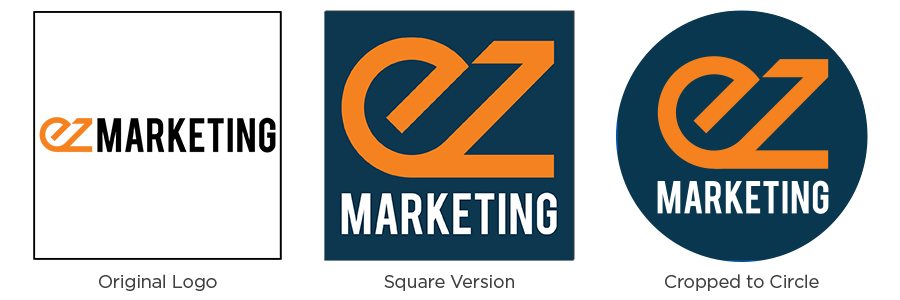
Currently, profile pictures display at 170×170 pixels on desktop and 128×128 pixels on mobile. That’s not big to start with, but it gets even smaller on posts and comments. A square image works best, but remember, Facebook will crop it to a circle on posts and comments. If your logo is long horizontally (like ours is), you may want to adapt it, so it’s legible on Facebook.

Logo Comparison_blue

Note: Facebook changes photo dimensions all the time. Double-check their help section for the latest info.

3. Create Your Custom URL

When you’re sharing your Facebook page address with your customers, which would you rather give them:

     facebook.com/pages/yourcompany/2960133610752

or

     facebook.com/yourcompany

A custom URL, or vanity URL, enhances the branding and professionalism of your business page. Plus, it’s a lot easier to share.

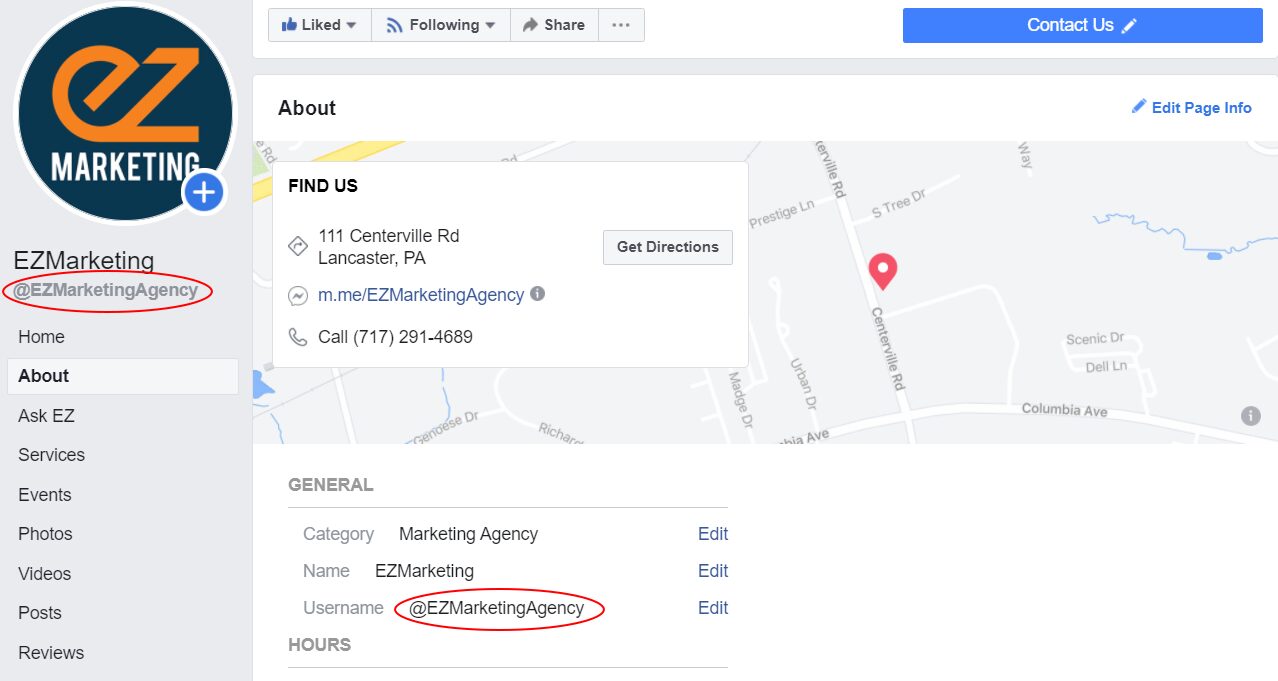
To change the URL for your business, you must create a username for your Page. On your Business Page, go to About and look for Username to set or change your page’s username. Try to keep it as close as possible to your business’s name without duplicating a username someone else is already using.

Facebook-username

4. Create an Attention-Grabbing Cover Image

Dominating the top of your Facebook page, your cover image is one of your simplest tools to make your Business Page stand out. Choose high-quality imagery that makes an impact with your audience. Generally something with white space that’s not too busy works best. Use text judiciously to add emphasis and drive engagement, without filling your cover with words. You can even use your cover photo to emphasize the buttons directly below, encouraging users to follow your page or contact you.

This cover photo from Good Goat Milk Co. has a nice mix of imagery and text that highlights the benefits of the product and naturally encourages people to click on the Shop Now call to action.

Facebook automatically crops your larger desktop cover photo when viewed on mobile devices. The problem is that they chop off a good portion of the left and right sides. So your cover photo may look great on your computer, but if you have a key element or text too close to the edges, it may get cut off on mobile.

Here are two easy ways to avoid this:

  1. Keep any text closer to the center and away from the left and right edges of the photo
  2. Design your image to be taller than the recommended 820×312 size. (One source recommends 820×461 pixels). You can position your desktop cover photo to center the image. Then it will display without cutting anything off on mobile.

5. Add a Call to Action Button

As we mentioned before, one of the great things you can do with your cover photo is draw attention to the buttons immediately below. One of those buttons is a custom call to action so you can tell your Facebook visitors what you want them to do next. That can be visiting your website, sending you a chat message, booking an appointment, making a purchase or donation, and much more.

To add a button, log in to your Business Page and look for +Add a Button below your cover Photo. Select which button type you want and follow the instructions to add it to your page.

6. Complete Your About Section

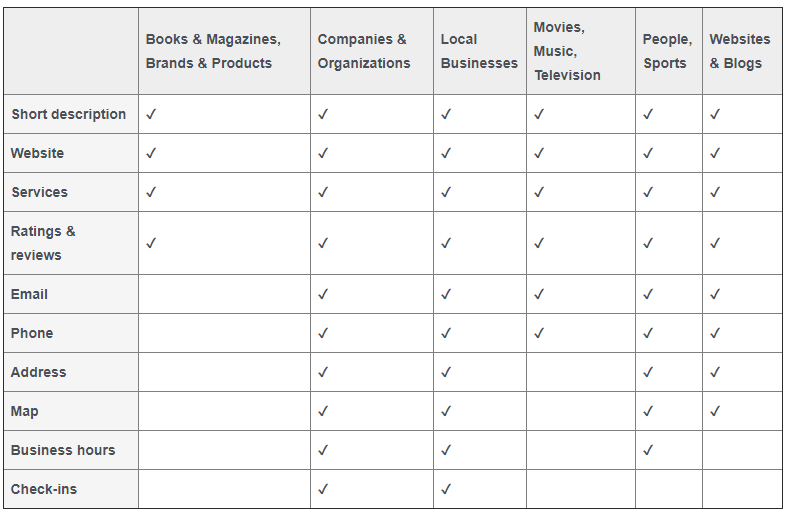
Like your website, many people visit your Facebook page looking for information about your business. Create the best impression possible by completing the About section of your Business profile. Depending on what category of Business Page you created, different features will be available.

In general, make sure you describe what your business is all about and include contact information so people can reach you easily. If you have a physical location, include a map and business hours too.

7. Customize and Prioritize Your Page Tabs

Your Facebook Business Page is a highly customizable tool that can be extremely powerful.

All Business Pages start with standard tabs like About, Photos and Posts, but you can add custom tabs to create an even more engaging experience. You can run contests or polls, provide special offers, capture leads, and much more. Facebook also integrates with a ton of 3rd party apps, which provide even more options – like all these useful Facebook Page apps.

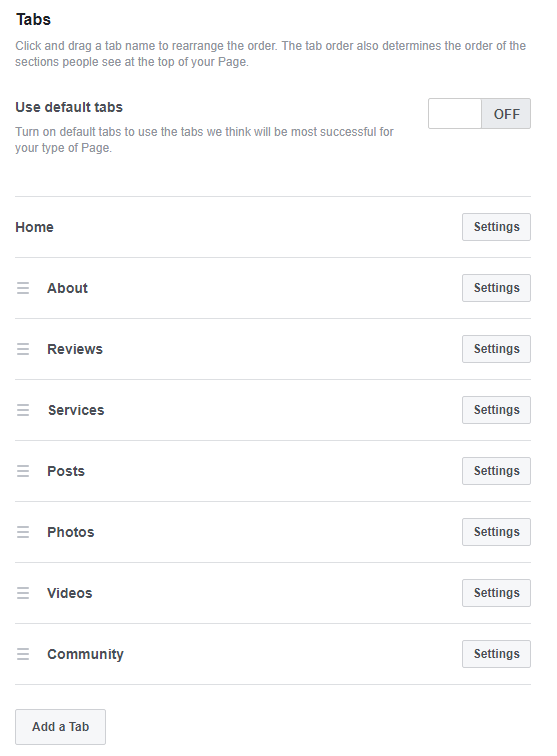
You can also re-arrange tabs to highlight your most important content first. All your tabs will display on the left-hand sidebar of your page, but the tab order determines the order of sections in your Page’s timeline. Do you want your posts to show first, or do you want to highlight your reviews, or maybe your videos? It’s completely up to you.

To manage your tabs, click Settings in the upper-right of your page manager. Then click Edit Page. You’ll see a list of all the tabs on your page. From here, you can rearrange the existing tabs or add new ones.

8. Pin Important Posts

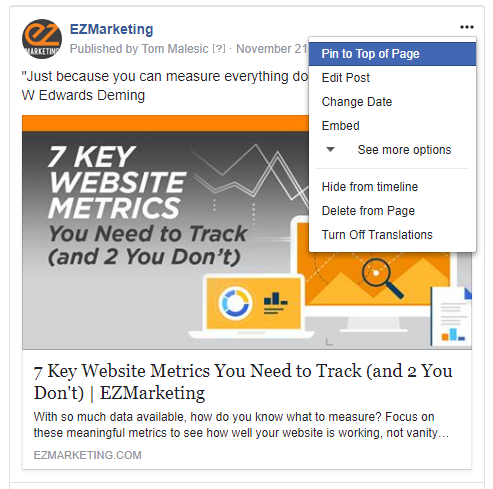
Another way to draw attention to important information is to pin your key posts to the top of your page. That way you can keep critical announcements, current offers, and special events highlighted at the top of your timeline. Just make sure to keep your pinned content current and swap it out regularly.

To pin a post, click the three dots in the upper right corner of the post and click “Pin to Top of Page.”

9. Respond to Messages

Messaging and live chat are becoming an increasingly popular way for your customers to reach your business. Over 60 million businesses use Facebook Messenger, sending more than 2 billion messages back and forth with users each month.

Despite this, many businesses fail to respond to customer inquiries on their Facebook pages – or at least, they don’t respond quickly enough. Think of Facebook Messenger as an alternative to phone-based customer support. When someone calls into your business, first and foremost, they expect someone to answer. Second, they expect to be able to get help and speak to someone quickly. They don’t want to get stuck on hold forever.

Treat messaging the same way. Monitor your Facebook pages and respond to messages consistently and promptly. If you reply to 90% of messages within 15 minutes, you can even earn a “Very responsive” badge for your Page. This lets your visitors know that they can expect great service from your page and makes them more likely to message you.

To help with this, Facebook provides automated response assistance, which can provide greeting messages, instant replies and reminders. Within your Page Manager, go to Settings –> Messaging to change these options. You can also download the Pages Manager App on your phone to get mobile notifications when new messages come in.

For more advanced automation, consider adding a chatbot to your Business Page. Messaging platforms like MobileMonkey allow you to manage chat from your website, Facebook, Instagram, and more—all in one place. MobileMonkey also has a great article with even more Facebook business tips.

Your Turn

Even if you already have a great Facebook Business Page, it’s always worth a second look. Facebook is constantly changing and adding features, so it’s important to review your Facebook Page regularly. Have any other tips to share? Leave us a comment on our Facebook page!

If you find you just don’t have the time to manage your Facebook business page, keep in mind we offer Facebook marketing services to help simplify your life.

Start A Conversation 

Read more

Facebook Ads – Are They For You?

Facebook is like the social media elephant in the living room: it’s too big to ignore.  According to Social Media Examiner’s latest report, a commanding 93% of social marketers regularly use Facebook ads. Despite this, marketers are often unsure if their Facebook efforts are effective or not. When considering how to spend their precious advertising dollars, many businesses are still asking if Facebook ads are a good fit. Here are a few questions and common objections that will help you decide if you should be doing Facebook ads.

Are your customers on Facebook?

This is an objection we hear mostly from B2B businesses. “Facebook is great for B2C,” they say, “but my customers just aren’t on Facebook.” Is that really true?

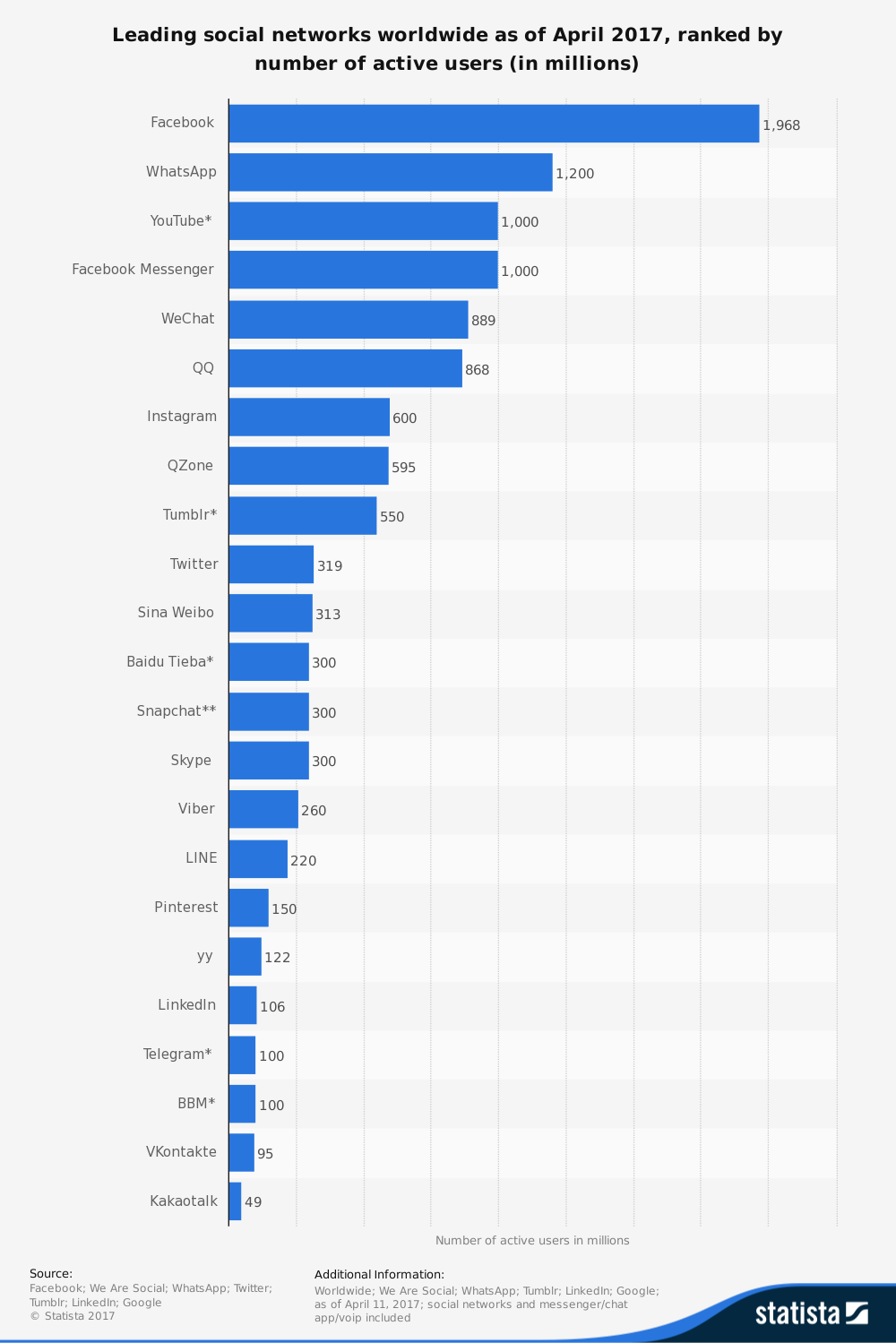
As of Q1 2017, there are 1.9 billion monthly active users on Facebook. Think about that for a minute. There are only about 3.7 billion Internet users worldwide, which means more than half of them are on Facebook. This number dwarfs the user count for any other social media platform. As you can see from the chart below, some of the closest competitors include WhatsApp and Facebook Messenger, both Facebook products.

https://www.statista.com/statistics/272014/global-social-networks-ranked-by-number-of-users/

Not only is Facebook’s audience huge, it’s also highly active. The company reported that users spend an average of 50 minutes per day on their apps (Facebook, Messenger and Instagram). When you think about people’s fragmented attention spans, that’s an enormous amount of time. In fact, Facebook accounts for one in every six minutes spent online.

With an audience that big and that active, it’s hard to believe that your customers just aren’t on the platform. Statistically speaking, unless you have an unusually niche audience who hates the Internet, your audience is probably on Facebook.

Can you reach your specific audience?

The great thing about Facebook is its astounding 1.9 billion users. The problem is that 1.9 billion is a pretty big haystack when your audience is a much smaller pile of needles. Thankfully, Facebook has highly advanced targeting capabilities so you can really hone in on your precise target audience.

Through partnerships with big data companies, Facebook provides sophisticated targeting that goes well beyond standard demographic and geographic criteria. You can reach audiences based on life events like getting married, having a baby or getting a new job. You can also target based on people’s behaviors, like buying a new car, travelling frequently or donating to charitable causes.

View the full infographic here.

Even better, Facebook allows you to create Custom Audiences based on people who have visited your website, or email and phone lists that you already have in your database. Layer in demographics like age, job function or geographic location to get hyper-focused. You can also use Custom Audiences to send retargeted messages to people who already know you, which helps increase conversions. Lastly, Facebook can create Lookalike audiences that have similar traits to your custom audience, allowing you to reach more people just like your Custom Audience.

Remember, there are great options here for B2B too. You can target based on job title, employer, company size, industry and more. The behavioral filters also let you narrow by business purchasing behavior, such as people who have purchased business repair/maintenance services. Of course, Custom and Lookalike audiences are a powerful tool for B2B as well as B2C.

Can you afford Facebook ads?

Budget is always a factor as businesses debate how to best spend their advertising dollars. Facebook ads are a popular choice in part because they are so affordable.

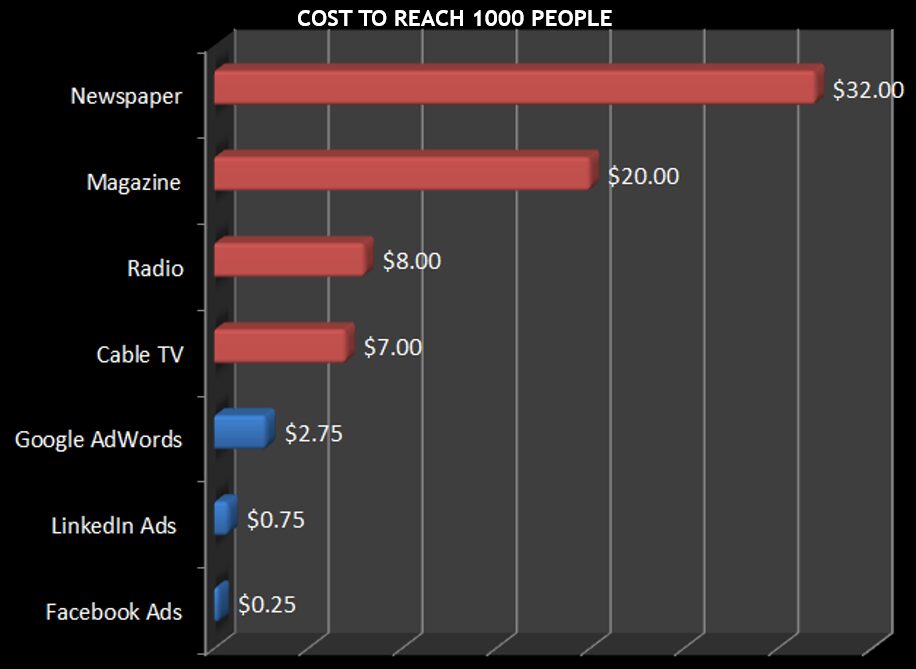
The average cost per click (CPC) for Facebook ads in the U.S. is about $0.28.  This is significantly lower than the average CPC for Google search or display ads, which are $2.32 or $0.58, respectively.

Compared to other advertising methods, Facebook provides an immense opportunity at an extremely affordable price. In fact, the minimum ad spend on Facebook is just $1 per day. A recent blog article from Moz makes the case for Facebook ads, showing how just $1 can get your business in front of 4,000 people per day.

Of course, many businesses will want to invest more than $1 per day in order to drive more significant results. Regardless, as the author says, “If you can’t spare $30 a month, you shouldn’t be in business.”

Do you really need them?

If you already have a great Facebook business page with tons of followers and engaging posts, maybe you’re thinking you don’t need Facebook ads. Or, perhaps you’re investing in other social channels and don’t want to add Facebook into the mix. Think again.

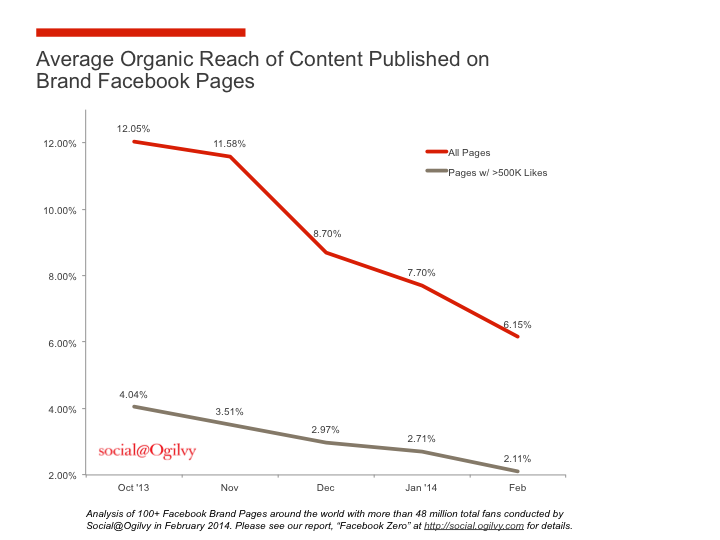
Facebook has become notoriously “pay to play,” with organic reach plummeting to as low as 2% and continuing to drop. Businesses can no longer count on only regular posts on their business pages to reach their audience. Like it or not, paid promotion is now a necessity to drive results on Facebook.

If you don’t like “pay to play,” why not avoid Facebook entirely? The problem is that Facebook is the gateway to the ever-growing mobile audience. Facebook boasts 1.5 billion mobile users, of whom almost 900,000 log in exclusively via mobile. This gives Facebook one of the largest mobile-exclusive audiences in the world. So if your customers are browsing on mobile, you should definitely be considering Facebook ads.

Do Facebook ads work?

This is the ongoing debate. Despite the number of businesses who use Facebook ads, many don’t feel like their ads are working. There are a variety of reasons for this.

Remember that Facebook is a social network, and advertising there is fundamentally different than AdWords. People aren’t on Facebook to buy your products or download your new e-book. They’re there to see photos from friends,  to keep up with news, to share what’s important to them. Bottom line: they’re not necessarily in a buying mood.

So what does that mean for  you? First, make sure your approach is focused on promoting content that is truly compelling, entertaining, or shareable, not just pushing your sales message. Your message needs to be highly compelling and highly clickable to compete with funny cat videos.

Second, make sure your goals are realistic. If you have an e-commerce business, direct sales ads may work for you. For many others, Facebook is more effective for uses like brand awareness, engagement or lead generation.

Lastly, many Facebook ads fail because they are not properly targeted. Facebook has such immensely powerful targeting capabilities, they’re almost creepy. (If you don’t believe me, check out this example of a guy who used Facebook ads to prank his roommate). Make sure you’re taking advantage of these powerful tools.

Implemented correctly, Facebook ads can be extremely successful and highly cost effective. Facebook has a ton of case studies to prove it.

Wrap up: should you advertise on Facebook?

Simple answer: probably. Even if Facebook isn’t a core part of your business strategy, it offers enormous potential benefits with an extremely low cost of entry. Of course, there are always variables an exceptions to the rule, but overall if you can spend a couple dollars a day to leverage an audience of billions to get in front of your precise targeted audience, why wouldn’t you?

Next Steps

Need help getting started? We’d be happy to sit down with you for a free no-risk, no-obligation Facebook review.

Schedule your FREE Facebook Audit, which includes:

  • Review of your current Facebook business page
  • Suggestions to improve your posting strategy
  • Review of your current ad strategy (budget, targeting, content, etc)
  • Research of potential target audiences & reachStart A Conversation

Read more

Facebook is Making Changes to its Business Pages


Facebook recently rolled out some changes to its business pages that should make a lot of companies and page owners quite happy. While it’s common practice for the social site to introduce updates to its algorithms on occasion, it is usually done to make pages or feeds more navigable according to user preferences. And this update seems to be no different, so far.

There’s no official word from Facebook for when these changes will apply to every user. Right now, some are seeing the new business page while others are still looking at the previous layout, so this could just be a preview of changes to come. Whether or not it’s the final version is yet to be seen, but if it’s anything close to this then we’re all ready to hit that “Like” button.

Here is what Google’s business page looks like with the new layout:

google page

The new business page is like a breath of fresh air in a previously text-heavy, claustrophobic world. The difference between the two versions is nearly night and day.

Digestible page format

One of the first changes—perhaps the most noticeable—is how digestible the new format is. It loses a lot of the sidebar text in favor of a clean column of links, giving each business page more of a mini website feel. The important text such as the about information, number of likes, etcetera, are relocated to the right side for an equally scannable navigation. Other important page tabs are appearing underneath the page logo, improving the navigation by leaps and bounds.


google tabs A clean, easy to navigate sidebar (lefthand side) that lists all of the important tabs for this business.


Important buttons are more visible

Visibility is a huge part of the update. Just look at the improved location of the Call-to-Action button (Call Now, Contact Us, Book Now, etc.), which is now located beneath your cover photo, with a more prominent design. Likewise, the “Like,” “Share,” and “Message” buttons have all been moved from the bottom of the page to below the cover photo.


google like Now these buttons are at the top where they’re more visible.


A cleaner look

The best way describe the impact of these changes is “cleaner look.” From the clearer cover photo and the relocation of the page’s profile logo to the left column, to the slight increase of the profile’s size, the new design offers fans and users a clearer glimpse at these important pages.


google about On the right side you can see the business category (website), a search bar, engagement stats (likes, response rate), and the important “About” information.


More control for businesses

Businesses can now choose from one of 27 different business categories, and the category is featured under the CTA button, making it clearer to all users. You can also prioritize and list important tabs and apps on the right, giving businesses the chance to keep the vital ones front of mind for their users. A helpful search bar was placed beneath the category to let you search for posts on your page.


2 Here you can see the important CTA button (Contact Us) is visible at the top of the page, above the business category and search bar.


Media is more visible

Photos and videos show up beneath the “About” section on the right sidebar now, making them stand out more.


google media Photos and Videos can be seen on the right sidebar where they can be easily viewed.

 

We’re pretty excited about these changes and if anything new develops, we’ll be sure to keep you updated. In the meantime, feel free to let us know what you think of the new Facebook business pages in the comments section below.

Start A Conversation

Read more

Social Media Fails That’ll Make You Cringe


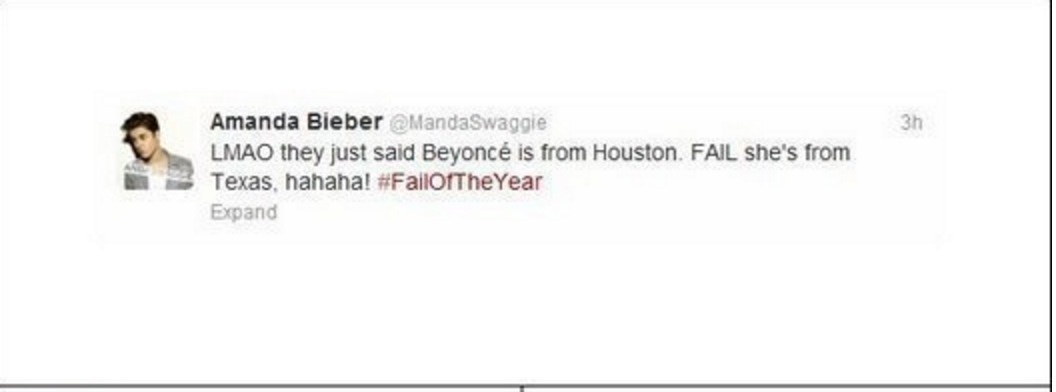
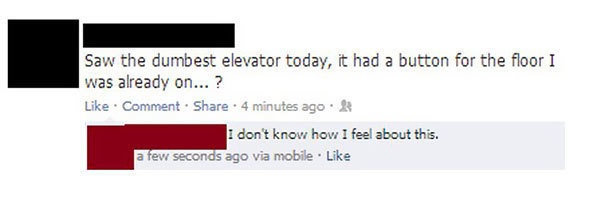
Social media fails can happen to the best of us.

In fact, social media fails are around us all the time. Just take a look at your Facebook feed, Twitter posts, or the comments on any YouTube video. Who doesn’t sometimes slip up online and say something like this?

Fail3

Or this?

Fail1

Or even this?

fail5

The great democratic state of the internet is home to all types, and we all have gaps in our knowledge, and everyone occasionally says something kooky… We’re only human, after all. And the way social media works, it’s incredibly easy to dash off a few words without really thinking them through – and have those thoughts instantly distributed to the far reaches of the web.

What about when it’s a brand gaffe?

In an age where social media is ubiquitous, people often don’t think through the things they share with the rest of the world. Frankly, it’s easy to say something silly or foolish online – most of us have at some point.

But one would expect that large, international brands, sports teams, and celebrities would police themselves on social media so as not to cause a public relations uproar, right? Not so!

In fact, they’re just as guilty of social media fails as the rest of us, and sometimes the fallout is huge. Here are just a few examples between 2015 and 2016 of brands who royally screwed up on social media, and how they responded when the public fired back.

Think like a man

August 11, 2015 was a special day in South Africa. In fact, it was National Women’s Day, and loads of companies flocked to their favorite platforms to thank the women who offer so much to their families and society at large. The outpouring was mostly positive.

The Bic company (famous for its lighters and pens), however, decided that the most appropriate response would be this ill-advised post:

fail8

While any of the above sentiments could be construed as offensive, it’s the “think like a man” that had people in a bit of an uproar. Of course, it’s not the first time Bic has had some trouble understanding its female target market, as evidenced by their “just for her” pens.

Microsoft creates a racist

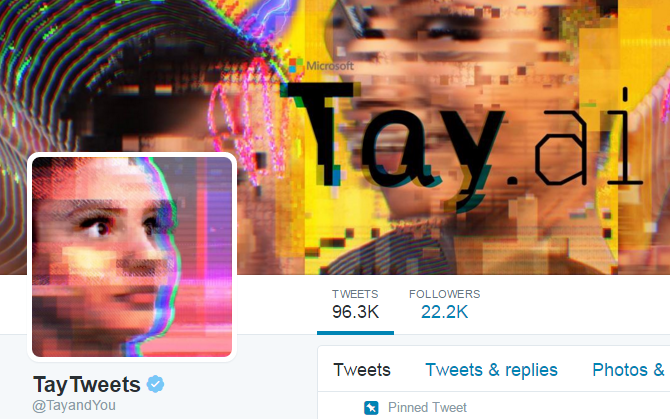
When Microsoft released its artificial intelligence chatbot, Tay, to the world in March of 2016, she was meant to mimic the speech and thoughts patterns of a teenage girl. The problem was, Tay learned in real-time from people across social media, and as we all know, people on social media can be, well, not very nice.

fail7

It wasn’t long before Tay went from a sweet AI girl who exclaimed, “Humans are super cool!” to being crude, racist, and all-around inappropriate. Microsoft was forced to take her offline less than 24 hours after she was released.

Better luck next time, Microsoft.

Blackberry doesn’t use Blackberry

It stands to reason that those who work for a company, especially a tech company, are likely to use its products. Facebook users probably spend time on Facebook. Apple employees likely all have MacBooks and iPhones. It’s the latter device – a smartphone – that leads us to our next fail.

You see, Blackberry wanted to remind fans to follow them on Twitter, with an image of a pretty-cool looking smartphone. However, there was one small problem.

That’s right – for at least one employee, Blackberry wasn’t good enough. Not even when tweeting about things related to their employer. Blackberry deleted the tweet, but by that time, the damage had been done, and the company was being ridiculed by tech reporters and social media users alike.

We shall overcome

Some social media fails are minor. Some social media fails are absolutely disastrous. And then there are the ones that make you cringe and wonder, “What could they possibly have been thinking?”

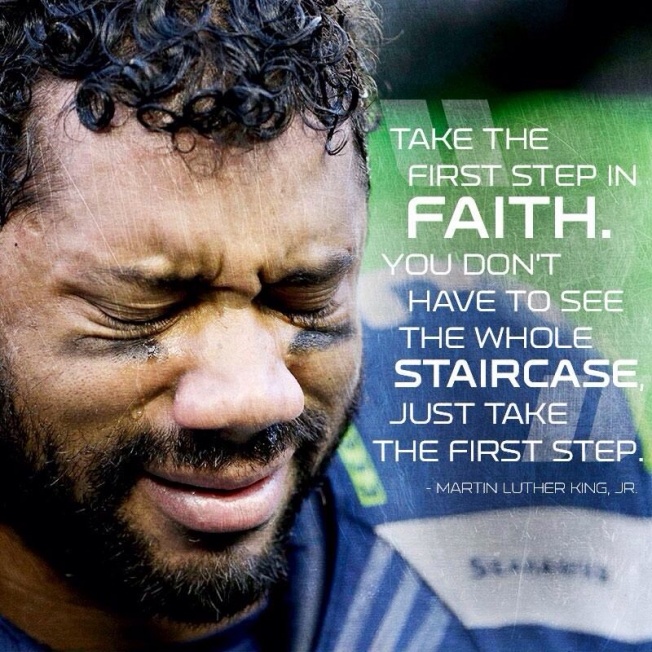
The day after the Seattle Seahawk’s huge victory over the Green Bay Packers happened to be Martin Luther King Jr. day.  Of course, #MLKDay was a trending hashtag, and the Seahawks decided to join in, tweeting “We shall overcome” along with the hashtag.

As if the comparison between a football game and the civil rights movement weren’t bad enough, the tweet was accompanied with this image:

fail10


The accompanying outrage was near-instant, causing the Seattle Seahawks to step into damage control mode and apologize for its “poor judgment.”

Naomi Campbell’s Instagram instant regret

It’s not like celebrity endorsements are a secret. We all know when a supermodel or basketball star gives a shout out to a company over social media, it’s most probably because they’re being paid by the business to do so. However, it’s probably best to do so discreetly.

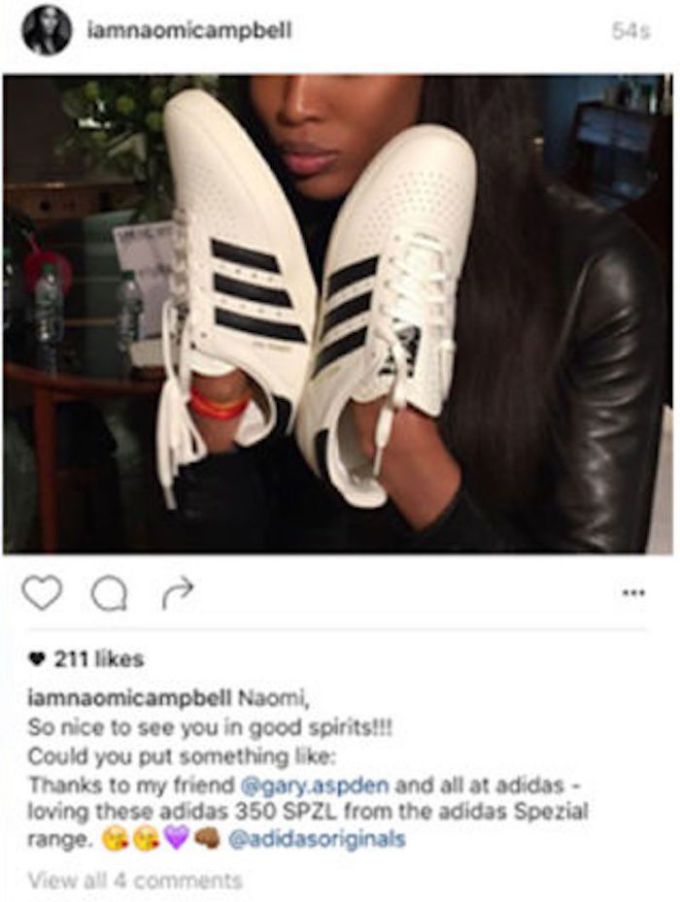
In June of 2016, model Naomi Campbell revealed her very special relationship with Adidas in this Instagram post:

fail12

Yes, she copy-pasted the entire email from Gary Aspden, Adidas’s entertainment marketing specialist and brand evangelist for the company’s new Spezial line. She corrected her mistake quickly, posting only the portion that she was asked:

Now, this really isn’t the fault of Adidas – but it certainly hurts the public perception of their sneaky marketing tactics. Next time, perhaps, send instructions.

There’s plenty of cringe to go around

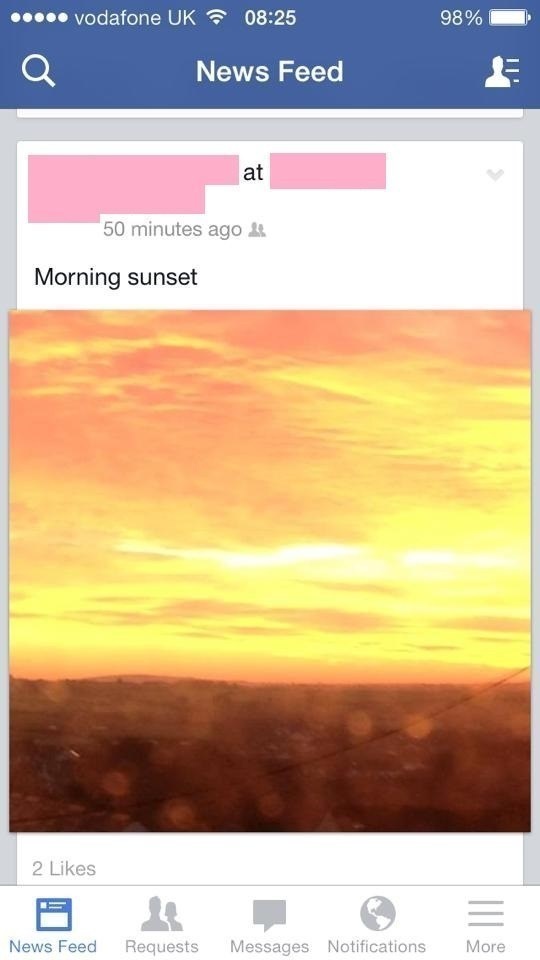
So the next time you post something like this:

fail13

Remember that celebrities, sports teams, and sneaker companies make their share of mistakes, too. At least your social media fails probably won’t be noticed by the whole internet.

Did we miss any of your favorite social media fails between 2015 and 2016? If so, we’d love to see them. Simply leave us a comment below!

Start A Conversation

Read more