How can I tell if my website is SEO-optimized? - Ask EZ

How can I tell if my website is SEO-optimized? – Ask EZ

While most small businesses understand that SEO is important you might not know exactly how SEO works, or how you can check your website’s SEO performance. Here are five simple things you can look for and some tools that can help you tell if your website is optimized or, needs help to rank. Keep watching.

Hi, I’m Tom Malesic, founder and president of EZMarketing, and you’re watching AskEZ. This is where small business owners go to get real answers to their marketing questions.

Is Your Website Already Optimized?

Before I jump in the simple answer to “Is my website SEO optimized?” is NO, because SEO is never done. SEO is an ongoing process. You constantly need to be adding changing and optimizing your content to stay on top of Google.

So if you’re not actively doing SEO your site is definitely not optimized. But if you are doing SEO or have done any in the past here are some things to look for.

5 Ways to Tell if Your Website is SEO-Optimized

Are You Getting Leads?

As a business owner the number one thing you should care about with SEO is are you getting leads from your website? Are they filling out forms or picking up the phone and calling you? And if you have a shopping cart on your site are you getting sales?

If you’re getting leads from your SEO, everything else is secondary. Your SEO company or your marketing team might be tracking 20 other things, but leads are key.

If you don’t know where your leads are coming from you should be tracking them. We have a leads dashboard where we can track all your form fills and phone calls and show you where each and every lead is coming from!

Titles, Metas, H1s

One of the easiest ways to tell if your site is SEO optimized is to look at your title tags, meta descriptions, and H1s. The title, description, and headers on each page should include keywords that you want your page to rank for.

For example, you can see that our web design page is optimized for the keyword ‘web design company’. It’s in the title at the top of the browser window and it’s in the main headers on the page.
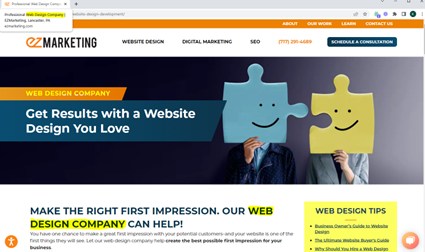
And if you search for web design company on Google, you’ll see the keyword again in the title and the description on the search engine results page.
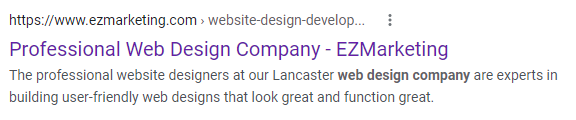
You can check each page on your website individually like this or we use a tool called Screaming Frog to crawl your entire site and show you all your titles and metas.

Keyword Rankings

Next if your site is SEO optimized you should be ranking for keywords that are relevant for your business.

Googling your keywords is one way to check rankings, but it can be inconsistent. So, we use a tool called SEMRUSH that can track all the different keywords you’re ranking for, how they change over time and even how your rankings compare to your competitors.

Site Speed & Mobile Friendliness

Google prioritizes websites that are fast and mobile-friendly, and their recent core web vitals update made site performance a ranking factor.

Bottom line: an SEO optimized site should load fast and provide a great experience especially on mobile. Google has a Page speed test and a mobile-friendly test where you can check to see if your website is optimized to meet Google standards.

Technical Site Audit

Finally, if your site is optimized for SEO, it should be relatively free of technical errors like broken links, 404 errors, uncompressed images, or other issues.

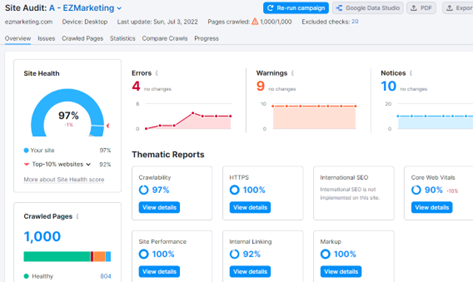
Using SEMRUSH we can do a site audit to improve the overall health of your site. Most of our clients start with a score of less than 50 percent and we work to keep their site health score at over 90 percent.
Have You Checked Your Site’s SEO Performance?

Again, SEO is an ongoing process is never truly done. But if you’re wondering if your site is SEO optimized look at your leads first, then dig into the details like your meta tags, rankings, and site performance.

Or even better contact me for a free SEO audit and I’ll run the reports for you and then walk you through how you can get better results from your SEO.

And of course, if you like this video, don’t forget to like and subscribe.
Read more

What You Need to Know about Google Analytics 4 - Ask EZ

What You Need to Know about Google Analytics 4 – Ask EZ

Q: What is happening with Google Analytics, and what should you do about it?

As you may have heard, Google is introducing a new version of analytics called Google Analytics 4. The existing version is called Universal Analytics and it’s going away. Today I’m going to cover what you need to know about Google Analytics 4 (GA4), and what it means for you.

Read more

How Do I Sell Products Online? - Ask EZ

How Do I Sell Products Online? – Ask EZ

Q: How do I sell products online?

If you want to get started with e-commerce, one of the most important steps is figuring out how to create an online store. Today I’ll go over the most popular ways to sell online, so you can decide what type of e-commerce platform is right for you. Let’s get started.

Read more

How Often Should I Send Email Marketing? - Ask EZ

How Often Should I Send Email Marketing? – Ask EZ

When it comes to email marketing one of the most common things I hear people worry about is: How often should I send email?

Now you’ve probably heard that the #1 reason for unsubscribing from a list is that you’re getting too many emails, but many people err on the side of sending too few emails because you’re afraid of spamming people. What’s the right email frequency for your business? To find out keep watching.

Read more

What Are the Best Marketing Strategies for Small Business? - Ask EZ

What Are the Best Marketing Strategies for Small Business? – Ask EZ

Video Transcription:

Business owners ask me all the time what sort of marketing should they be doing? Unfortunately there’s no one right answer. Every business is a little different. However we do have a go-to list of digital marketing strategies that we’ve used to generate huge results for clients again and again. To find out my top marketing strategies for small business owners keep watching.

Read more

How To Create A Social Media Calendar - Ask EZ

How To Create A Social Media Calendar – Ask EZ

How do you create a social media calendar?

One of the biggest challenges with social media marketing is figuring out what to post. You probably feel like you constantly need to come up with new ideas so that you don’t run out of things to say. Then you end up posting randomly, without much planning or strategy.

When you create a social media calendar it actually makes it easier to figure out what to post and how to organize your content for posting strategically. To find out how to create a simple social media calendar for your business keep watching.

Hi, I’m Tom Malesic, founder and president of EZMarketing, and you’re watching AskEZ. This is where small business owners go to get real answers to their marketing questions.

3 Elements of a successful social Media Calendar

Think of your social media calendar like TV programming. TV stations have regular consistent programming that’s designed to appeal to their viewers. Your social media calendar should be the same.

To do that you need to look at three basic things. You need:

  1. Channels
  2. Content
  3. Frequency

Channels

First channels. Where are you publishing your content? Is it Facebook, Instagram, or YouTube? And how do you decide which platform is best? My rule on this is go where your customers are. Whatever social channels they use the most often that’s where you should be.

Once you know which channels you want to be on you can start planning what you want to post on each one of them. That’s where content comes in.

Content

The goal of a social media calendar is to help you post content that’s relevant and consistent. To do this think of your content as shows on a TV station. What are the recurring topics or categories that you want to talk about?

As an example, AskEZ is one of our shows where we regularly post educational videos about marketing. We also have recurring topics like announcing website launches, inspirational quotes, and promoting our marketing services.

Here are a few tips to help you fill up your content calendar.

Analyze past posts

I want you to look at what you’ve posted in the past and what worked best, and then–obviously–do more of what worked best.

>>Related Video: How to Interpret Your Social Media Reports

Take an inventory

You can also take an inventory of your content that you already have. These are things like blogs, videos, photos of your work, products, or even testimonials from happy customers. These things are great to post and even re-post so that you don’t have to keep reinventing the wheel.

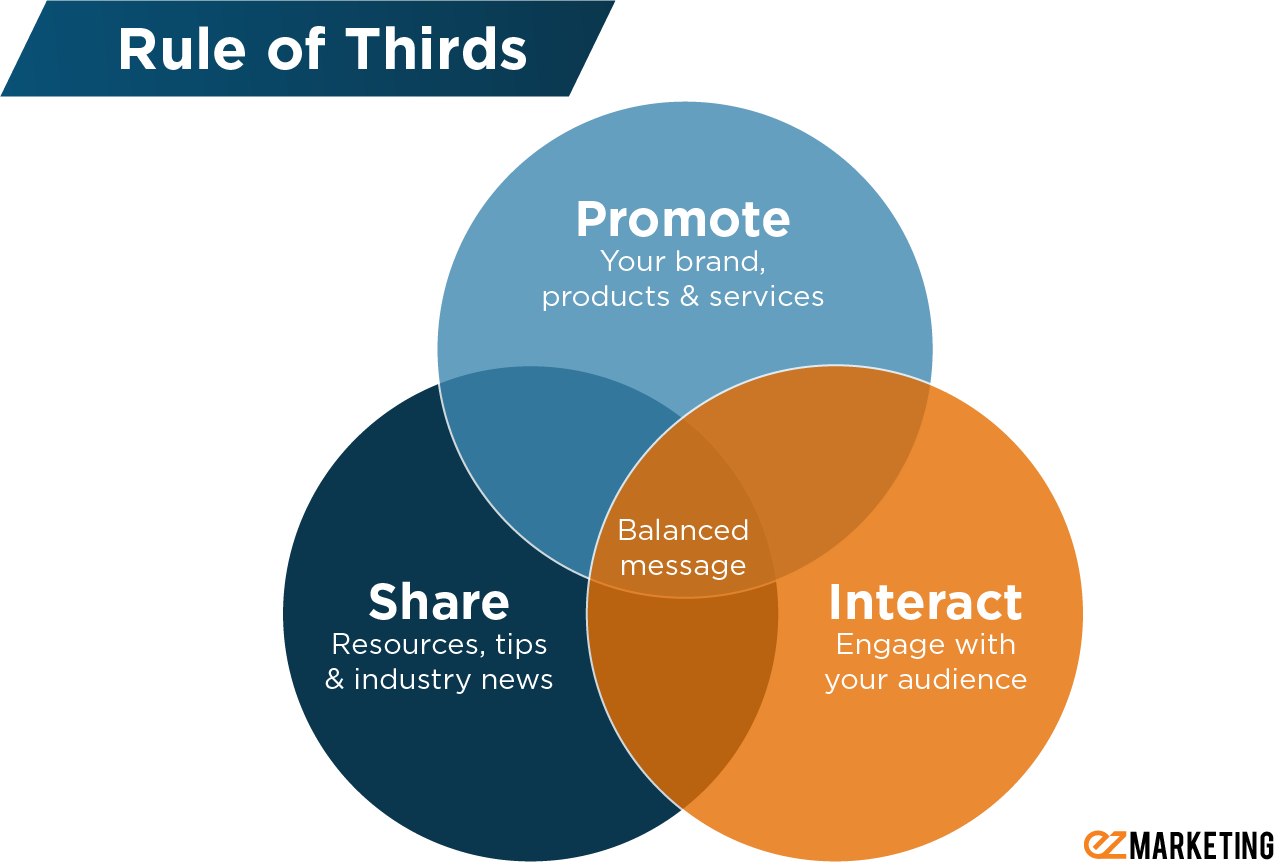
Remember the Rule of Thirds

Also keep in mind the rule of thirds. Your content should be balanced among three things:

  1. Sharing interesting information
  2. Interacting and engaging with your customers
  3. Promoting your business, products, and services

social media rule of thirds

Frequency

Lastly, your social media calendar should help you plan how frequently you’re going to post. Each channel is going to be a little different. Facebook you might want to post every day, where Linkedin you might want to post only once or twice a week.

So how often should you post? You can look up general guidelines but here’s my golden rule: post only as often as you have something relevant to say.

Yes, you want to be consistent, but you shouldn’t just be posting for the sake of posting or because someone told you that you have to post on Instagram twice a day. If you don’t have something worthwhile to say it’s a waste of your time and money to say it.

Social Media Calendar template

So to create a social media calendar think about your channels, your content, and the frequency of your post.

We have a free social media calendar template that can help you do all this. It includes calendar pages for each channel, a calendar inventory page, and even a list of topics to help you get started. Click on the link below to download it for free.

And of course if you like this video, don’t forget to like and subscribe.
Read more