Tom - Nido

3 Lessons I Learned from Nido Qubein

I have been extremely fortunate in my career to have met some amazing business owners and leaders. This past week, I attended a conference where I heard Dr. Nido Qubein speak. He is the President of High Point University, serves on the board for BB&T, and has built many businesses throughout his career.

Read more

Top Failed Marketing Campaigns

Top Failed Marketing Campaigns

You might have this fantastic idea that has everyone at work talking. But when you finally launch the new digital marketing campaign to the world, you receive less-than-thrilled responses. Maybe your excitement got the better of you or no one in the company stopped to wonder how others might perceive your new campaign.

Either way, we’ve compiled a list of the top failed marketing campaigns in recent years, to show you how some of the biggest names in business today set themselves up for failure—and lessons we can learn from bad marketing.

Read more

6 Steps to Build a Successful Marketing Plan

6 Steps to Build a Successful Marketing Plan (with Template)

Starting with a marketing plan is one of the best ways to set your business up for success and make sure you’re investing your marketing dollars wisely. Whether you’re revising your marketing strategy or building a new one, use our handy template to help get you started!

How to Create an Email List: 14 Easy Methods

When it comes to email marketing, often the biggest challenge is simply building your email list. Many businesses wish their email database was larger. Others don’t have one at all and need to start from scratch. Regardless of where you’re at, it’s worth investing the time in creating a robust, targeted email list.

Why Email Marketing?

Let’s admit it: we’ve all deleted email marketing emails without even opening them. Regardless, email is still one of the most effective ways to communicate with your customers and prospects. In fact, 72% of consumers actually prefer for businesses to contact them via email.

When done well, email is also one of the most cost-effective marketing channels out there. In a 2016 study by Econsultancy, 75% of companies reported that email offers “good” or “excellent” ROI. What does that mean in dollars? According to Campaign Monitor, email marketing returns $44 for every $1 spent.

The trick is that effective email marketing requires a good email list.

What You Need Before You Create Your Email List

Before you start building your email marketing list (or growing it, if you already have one), make sure you’ve covered these basic steps:

1. Know who you’re trying to reach

It’s great if you have a big email list, but if it doesn’t contain the right people, it’s not going to do you any good. Make sure you know who your target audience is, and try to understand who they are, and what they need. Creating buyer personas can help!

 2. Identify what’s in it for them

People aren’t going to give you their email address unless you give them a good reason. Think of it like a trade. They are giving you their email address and trusting you enough to let you into their inbox. What are you giving them in return? Think about resources, offers, or incentives that would be valuable and motivating to your target audience.

3. Get an email marketing provider

For professional email marketing, Gmail, Yahoo, and Outlook aren’t going to cut it. You need an email marketing campaign to help you create and send emails and manage your list – especially bounces and unsubscribes. You can use inexpensive tools like MailChimp or Constant Contact, or a more robust CRM system like Hubspot or Insightly if you need more features.

4. Have a website

While you can build an email list without a website design, it’s a lot harder. Since email is a form of digital marketing, it’s easiest to collect that information digitally. Your website is the center of your online presence, so it’s the perfect place to gather email addresses. You don’t need anything complicated, but at a minimum, you need a website that proves you are a legitimate business and includes an opt-in email form.

What NOT To Do

Don’t buy email lists

Buying an email list might seem like the easy way to get contacts fast, but we strongly advise against it. Even if the list company says that their contacts are accurate, well-vetted, and opted in, you’re still dealing with cold contacts who are not expecting to hear from you. It’s a low-quality list that is unlikely to generate high response rates and much more likely to annoy people.

Furthermore, most reputable email providers have policies against using purchased email lists. If you try to do it anyway and the email addresses are bad or recipients mark the messages as SPAM, you’re likely to get in trouble with your provider and suffer from low deliverability.

Don’t be spammy

Purchasing lists may be annoying, but in most cases, it’s not technically illegal. However, there are certain rules you need to follow when sending out email marketing messages, based on the CAN-SPAM Act of 2003. Most importantly, you need to make sure that you’re honoring unsubscribes and not continuing to email people who have opted out. Beyond that, make sure that you include contact information and unsubscribe options, and that you’re clearly and truthfully representing who you are and the subject line of your message.

>>RELATED ARTICLE: What to Do (& Not Do) With Your Email Marketing

Definitely don’t be spammy if you’re dealing with European customers

If you collect data from any European Union citizens, you also need to comply with the General Data Protection Regulation (GDPR) that went into effect on May 25, 2018. GDPR is much more rigorous than CAN-SPAM and sets a high standard for “freely given, specific, informed, and unambiguous” consent in order to send marketing messages. Even U.S. businesses who aren’t immediately affected would be wise to ensure they’re following best practices for email marketing and opt-ins.

14 Easy Ways to Build Your Email List

1. Include email opt-in forms on your website design

Your website is one of the best and easiest places to gather email information. If you have a blog or a newsletter, or you just send out company updates, include prominent calls to action (CTAs) on your website to ask visitors to sign up.

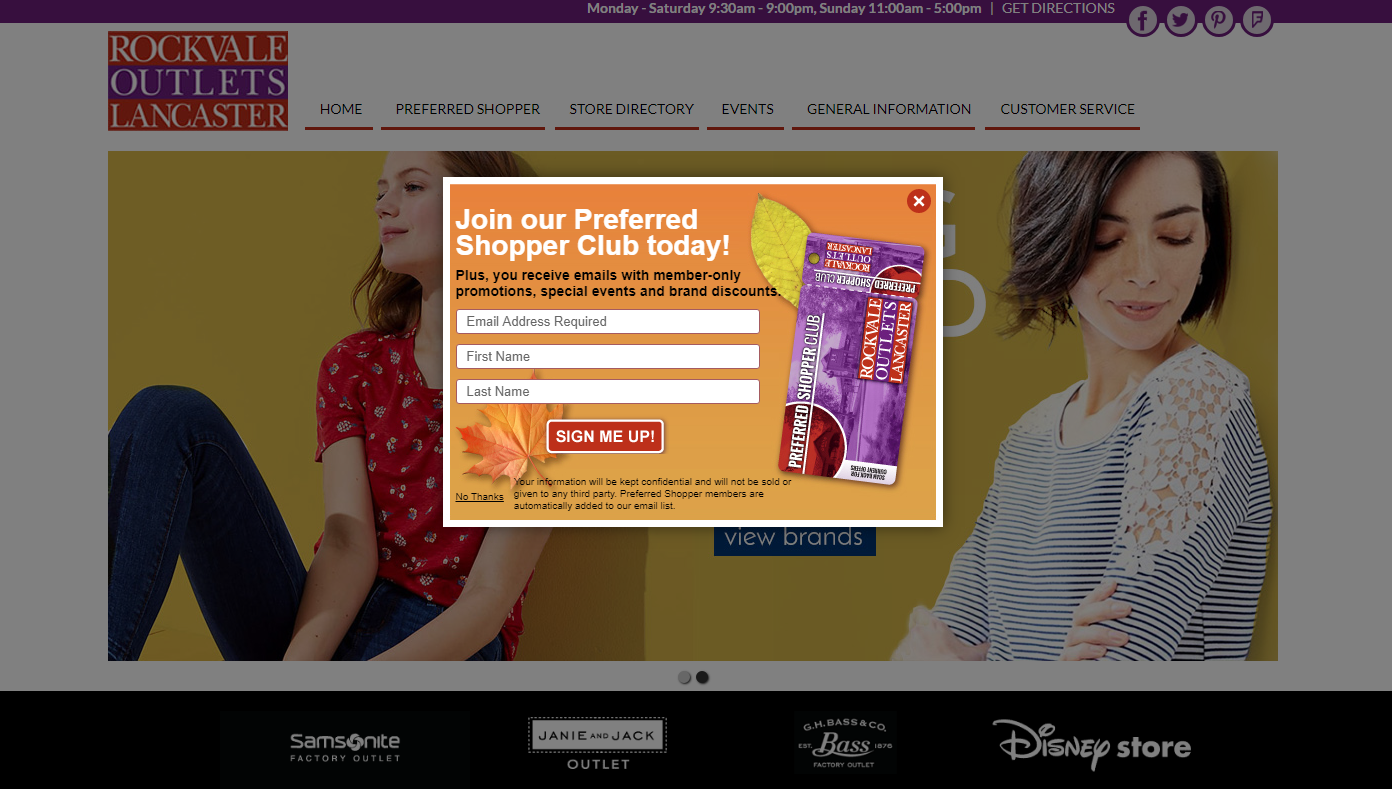
Pop-up boxes are particularly popular for this. We may say they’re annoying, but they are effective. A study by Sumo reported that pop-ups converted at an average of 3.09% (which isn’t bad by itself), and top-performing pop-ups averaged a 9.28% conversion rate – which is excellent! You can set pop-ups to appear after a certain amount of time, at a certain point on the page, or when someone is about to exit the page. For a more polite option, you can have a box slide in from the side too.
Rockvale Outlets pop-up

This pop-up from Rockvale Outlets grabs your attention and offers member-only discounts and specials to incentivize visitors to join.

If you don’t like pop-ups, try including noticeable CTAs on a sidebar, or at the footer of your site (like the one below). Or, if you have a blog, you can include sign-ups alongside your articles to encourage users to subscribe for more content.

ERL_footer signup

Source: Explore Retirement Living

2. Offer high-value gated content

Gated content is the stuff you only give away in exchange for personal information – things like e-books, templates, guides, or webinars. These resources have a high perceived value for your audience, so it’s worth it to exchange an email address to get them.

Try including gated content offers within your normal, ungated content on a similar subject. For example, we recently wrote a blog post about building buyer personas. Within it, we have a call to action for a downloadable buyer persona template. This allows us to identify people who are more deeply interested in the topic and gather their contact information for further nurturing.

3. Create online tools or calculators

If e-books and white papers aren’t your style, consider creating a free online tool or calculator. Just ask for an email address in order for the visitor to see the results. For example, Hubspot’s Website Grader offers a ton of useful information about your website and helps them capture tons of new email addresses.

4. Use an online quiz

Quizzes are useful for much more than finding out what your spirit animal is or what Game of Thrones character you are. Create a quiz related to your business to add some fun and interactivity to your marketing while also gathering useful information about your prospects and customers (including their email address). Make the results shareable on social media to increase your reach build your list even faster.

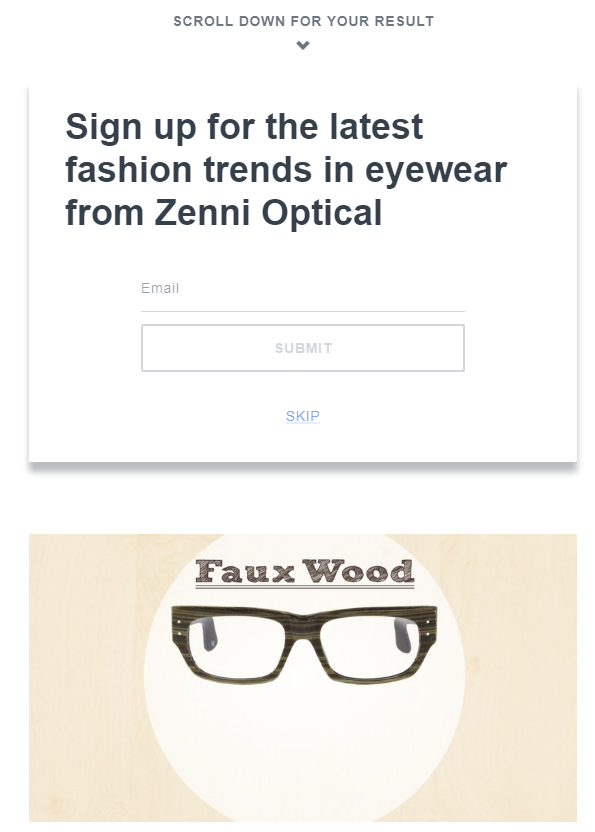
A quiz from Zenni Optical to find the perfect eyeglasses frames generated over 29,000 lead conversions (which translated into over $1 million in revenue). Not bad for one quiz.
Zenni Optical Quiz

5. Hold a contest or giveaway

Who doesn’t like free stuff? A contest or a giveaway incentivizes people to provide you with their contact information. Again, social media is a great tool for sharing contests to even more people. Take a look at these awesome Facebook contest examples for inspiration!

One cautionary note: someone who gives you their email address for a chance to win something isn’t necessarily opting into marketing communications from you. You may want to re-confirm or double opt in any new contacts from a contest or giveaway.

6. Leverage social media marketing

As we already mentioned, social media is great for promoting your content and getting more eyeballs on all your lead generation offers. Share links to your content on all of your social media pages, directing visitors back to optimized landing pages on your website design. You can also include social sharing buttons across your website to make it easy for visitors to share your content themselves.

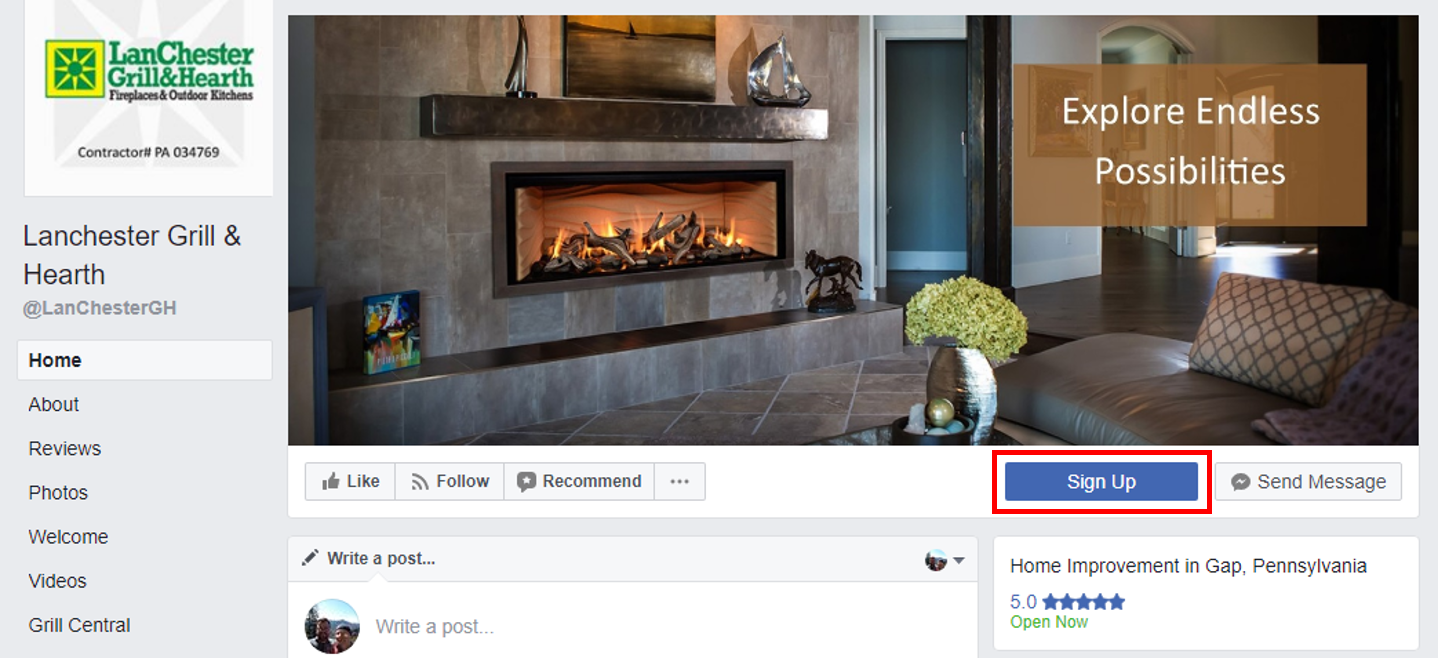
Additionally, your Facebook Business Page includes a call to action button at the top. Customize this to direct your Facebook audience to lead generation pages and sign up forms on your website.
Lanchester FB Page_rev

7. Ask for referrals

Including social sharing buttons naturally makes it easier for people to share your content, but it doesn’t hurt to ask too. If you have great lead generation offer that’s sharable, ask your customers to share it on social media, or forward an email version to friends and colleagues.

You can also create a refer-a-friend program where you incentivize your existing subscribes to invite their friends to participate too. Just be cautious that you’re getting permission from the referred friends before you start emailing them a bunch of your marketing materials.

8. Guest blog on other websites

Not only is guest blogging great for SEO marketing and earning backlinks to your website, it’s helpful for building your email list too! When you contribute to other websites, make sure you have a strong author bio attached the article. Within your bio, you can include links back to a blog signup page or content offer landing page on your website design.

9. Partner with other organizations or businesses

Think about business groups, trade organizations, or complementary but non-competing businesses in your industry – anyone who is targeting a similar audience. You can promote each other on your websites or email newsletters, so each of you gains some exposure to the other’s audience. For a deeper collaboration, consider co-hosting a webinar, writing an e-book, or partnering together on original research.

10. Collect emails in person

While there are plenty of ways to capture emails digitally, old-fashioned offline methods work as well. If you’re a retailer or a restaurant, especially, you could have an in-store sign-up sheet in your checkout area. Many stores also offer rewards programs, birthday clubs, or even simply digital receipts. Have your staff ask customers during checkout if they’d like to provide an email address to sign up.

11. Host or attend in-person events

From business meetups to conferences to trade shows, in-person events are a great way to meet new prospects for your email list. Collect business cards from people you talk to, and follow-up to ask if you can include them on your email list.

You can also host events like lunch & learns, seminars, book clubs, community events, and more. Just ask people to RSVP online with an email address.

12. Ask for emails on the phone

If your business receives a lot of inbound calls from prospects and customers, try asking for their contact information right away. It can be as simple as, “Would you be willing to provide an email address so we can stay in touch with more information?”

13. Use offline marketing

Traditional marketing might not seem like the most obvious way to gather digital information, but it can still be effective. Include shortened links, personalized URLs, or QR codes on print ads and direct mail. These should direct visitors to an optimized landing page with a compelling call to action to capture their contact information.

14. Include opt-ins during transactions

If you have an online business, you probably have email addresses for most of your paying customers. However, transactional emails like welcome messages, order confirmations, shipping notifications, etc. are a great way to reconfirm information and opt-in your customers specifically to marketing communications.

Meanwhile, if your customers buy from you offline, you may have a harder time capturing their email addresses. Still, transactional materials like product packaging, price tags, invoices, or receipts are great places to include CTAs for opt-in offers.

While some of these tactics for growing your list are faster than others, remember than any good email list takes time. When it comes to email marketing, quality trumps quantity. An accurate list of opted in, highly engaged contacts is one of your business’s most valuable assets, and it will pay dividends versus a large, cold list any day.

Struggling with email marketing for your business? Our Lancaster digital agency also offer email marketing services as part of our full line of internet marketing services which can help make your life easier so you can worry about other business needs while we nurture your customer relationships for you.

If you found this article helpful, don’t forget to share it on social media, or forward it to a colleague.

Start A Conversation

Read more

9 Quick Fixes to Improve Your Facebook Business Page

Your Facebook Business Page is like a second outpost for your business online. Nearly all of your customers will visit your website at some point before they buy from you. More and more are visiting your company Facebook page as well to learn more about your business. Make sure you’re creating the best impression possible with a strong Business Page.

Here are 9 quick tips that can help you boost the impact of your Facebook Business Page:

1. Don’t Use a Personal Page for Your Business

Even if you’re the face of your business, don’t try to substitute a personal Facebook profile for a real Business Page. First of all, you probably don’t want to mix your business communications with the pictures from your family vacation. Furthermore, personal profiles lack Facebook’s arsenal of business tools like page management, scheduling, advertising opportunities, and analytics. Business Pages are also public by nature, so your customers don’t have to “friend” you before they can interact with you.

Keep in mind that you do need to have a personal profile associated with your Business Page as an admin. In other words, Facebook needs to know that there is a real person managing your business account. However, your customers will not be able to tell that you are an admin or see any of your personal information.

If you need help getting started, here’s a simple guide on how to create a Facebook Business Page.

2. Add a Profile Photo People Will Recognize

Your profile picture displays on the top left of your Business Page as well as on all of your posts and comments. Essentially, it’s everywhere. So you want to make sure that it’s something your audience will recognize. In most cases, you’ll probably want to use your business’s logo, mascot or something similar.

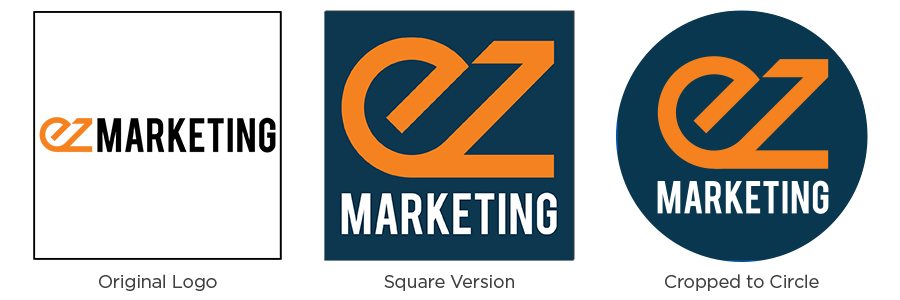
Currently, profile pictures display at 170×170 pixels on desktop and 128×128 pixels on mobile. That’s not big to start with, but it gets even smaller on posts and comments. A square image works best, but remember, Facebook will crop it to a circle on posts and comments. If your logo is long horizontally (like ours is), you may want to adapt it, so it’s legible on Facebook.

Logo Comparison_blue

Note: Facebook changes photo dimensions all the time. Double-check their help section for the latest info.

3. Create Your Custom URL

When you’re sharing your Facebook page address with your customers, which would you rather give them:

     facebook.com/pages/yourcompany/2960133610752

or

     facebook.com/yourcompany

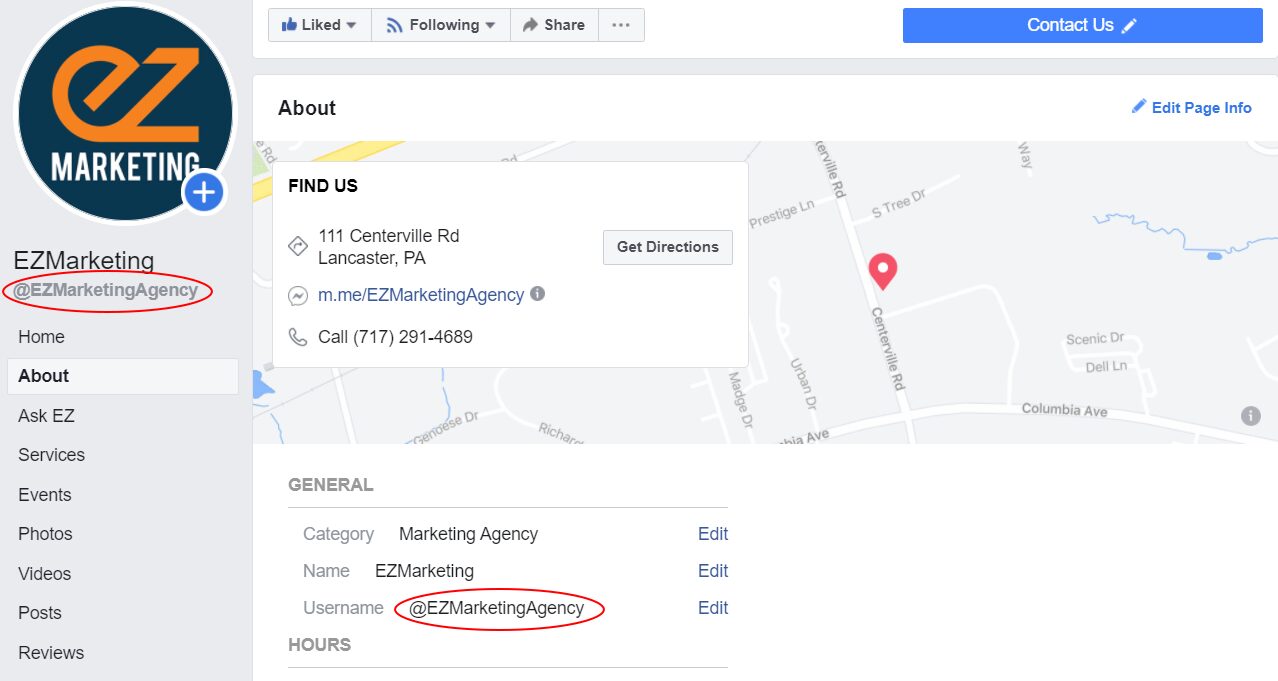
A custom URL, or vanity URL, enhances the branding and professionalism of your business page. Plus, it’s a lot easier to share.

To change the URL for your business, you must create a username for your Page. On your Business Page, go to About and look for Username to set or change your page’s username. Try to keep it as close as possible to your business’s name without duplicating a username someone else is already using.

Facebook-username

4. Create an Attention-Grabbing Cover Image

Dominating the top of your Facebook page, your cover image is one of your simplest tools to make your Business Page stand out. Choose high-quality imagery that makes an impact with your audience. Generally something with white space that’s not too busy works best. Use text judiciously to add emphasis and drive engagement, without filling your cover with words. You can even use your cover photo to emphasize the buttons directly below, encouraging users to follow your page or contact you.

This cover photo from Good Goat Milk Co. has a nice mix of imagery and text that highlights the benefits of the product and naturally encourages people to click on the Shop Now call to action.

Facebook automatically crops your larger desktop cover photo when viewed on mobile devices. The problem is that they chop off a good portion of the left and right sides. So your cover photo may look great on your computer, but if you have a key element or text too close to the edges, it may get cut off on mobile.

Here are two easy ways to avoid this:

  1. Keep any text closer to the center and away from the left and right edges of the photo
  2. Design your image to be taller than the recommended 820×312 size. (One source recommends 820×461 pixels). You can position your desktop cover photo to center the image. Then it will display without cutting anything off on mobile.

5. Add a Call to Action Button

As we mentioned before, one of the great things you can do with your cover photo is draw attention to the buttons immediately below. One of those buttons is a custom call to action so you can tell your Facebook visitors what you want them to do next. That can be visiting your website, sending you a chat message, booking an appointment, making a purchase or donation, and much more.

To add a button, log in to your Business Page and look for +Add a Button below your cover Photo. Select which button type you want and follow the instructions to add it to your page.

6. Complete Your About Section

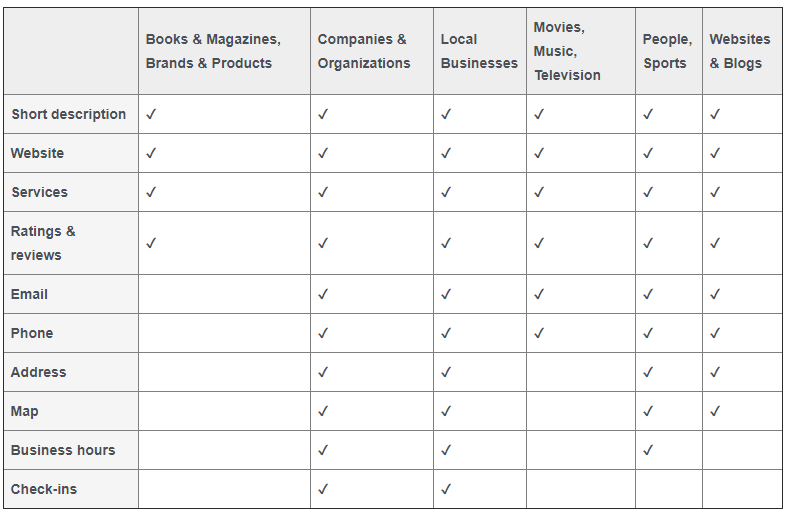
Like your website, many people visit your Facebook page looking for information about your business. Create the best impression possible by completing the About section of your Business profile. Depending on what category of Business Page you created, different features will be available.

In general, make sure you describe what your business is all about and include contact information so people can reach you easily. If you have a physical location, include a map and business hours too.

7. Customize and Prioritize Your Page Tabs

Your Facebook Business Page is a highly customizable tool that can be extremely powerful.

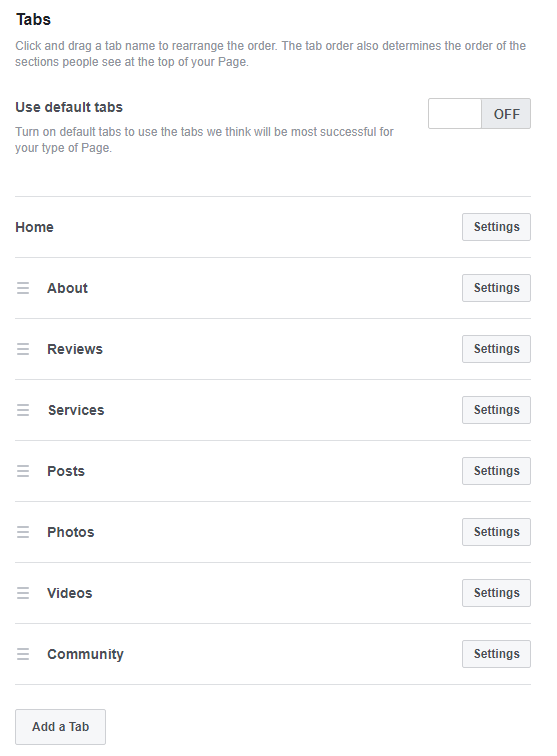
All Business Pages start with standard tabs like About, Photos and Posts, but you can add custom tabs to create an even more engaging experience. You can run contests or polls, provide special offers, capture leads, and much more. Facebook also integrates with a ton of 3rd party apps, which provide even more options – like all these useful Facebook Page apps.

You can also re-arrange tabs to highlight your most important content first. All your tabs will display on the left-hand sidebar of your page, but the tab order determines the order of sections in your Page’s timeline. Do you want your posts to show first, or do you want to highlight your reviews, or maybe your videos? It’s completely up to you.

To manage your tabs, click Settings in the upper-right of your page manager. Then click Edit Page. You’ll see a list of all the tabs on your page. From here, you can rearrange the existing tabs or add new ones.

8. Pin Important Posts

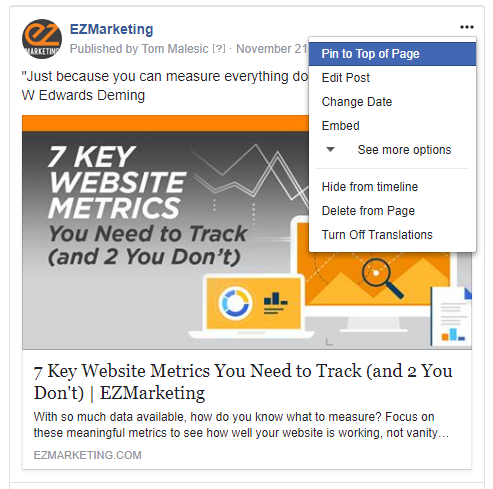
Another way to draw attention to important information is to pin your key posts to the top of your page. That way you can keep critical announcements, current offers, and special events highlighted at the top of your timeline. Just make sure to keep your pinned content current and swap it out regularly.

To pin a post, click the three dots in the upper right corner of the post and click “Pin to Top of Page.”

9. Respond to Messages

Messaging and live chat are becoming an increasingly popular way for your customers to reach your business. Over 60 million businesses use Facebook Messenger, sending more than 2 billion messages back and forth with users each month.

Despite this, many businesses fail to respond to customer inquiries on their Facebook pages – or at least, they don’t respond quickly enough. Think of Facebook Messenger as an alternative to phone-based customer support. When someone calls into your business, first and foremost, they expect someone to answer. Second, they expect to be able to get help and speak to someone quickly. They don’t want to get stuck on hold forever.

Treat messaging the same way. Monitor your Facebook pages and respond to messages consistently and promptly. If you reply to 90% of messages within 15 minutes, you can even earn a “Very responsive” badge for your Page. This lets your visitors know that they can expect great service from your page and makes them more likely to message you.

To help with this, Facebook provides automated response assistance, which can provide greeting messages, instant replies and reminders. Within your Page Manager, go to Settings –> Messaging to change these options. You can also download the Pages Manager App on your phone to get mobile notifications when new messages come in.

For more advanced automation, consider adding a chatbot to your Business Page. Messaging platforms like MobileMonkey allow you to manage chat from your website, Facebook, Instagram, and more—all in one place. MobileMonkey also has a great article with even more Facebook business tips.

Your Turn

Even if you already have a great Facebook Business Page, it’s always worth a second look. Facebook is constantly changing and adding features, so it’s important to review your Facebook Page regularly. Have any other tips to share? Leave us a comment on our Facebook page!

If you find you just don’t have the time to manage your Facebook business page, keep in mind we offer Facebook marketing services to help simplify your life.

Start A Conversation 

Read more

The One Reason Your Content Marketing is Failing

Nearly all businesses today are doing some form of content marketing – 91% according to the most recent industry study. Despite that, many marketers are still not seeing the results they want from their efforts. They write blogs, but no one reads them. They send out emails, but no one opens them. No one will like their Facebook page or follow  them on LinkedIn.

Maybe that sounds familiar. But with 79% of marketers saying they’re seeing success from content marketing, what are you missing? Why is your content marketing failing?

The answer: strategy. Specifically, a documented content marketing strategy.

Strategy Supports Success

Sometimes, content marketing can seem like a hungry beast – one that constantly needs to be fed. When you’re struggling to keep up a weekly blog, or regular social posts, it’s hard to stop and think about strategy. It’s no surprise that many small businesses (who often only have tiny or one-person marketing teams), end up doing random acts of content. They focus on feeding the beast, one blog-post morsel at a time, rather than figuring out a long-term strategy.

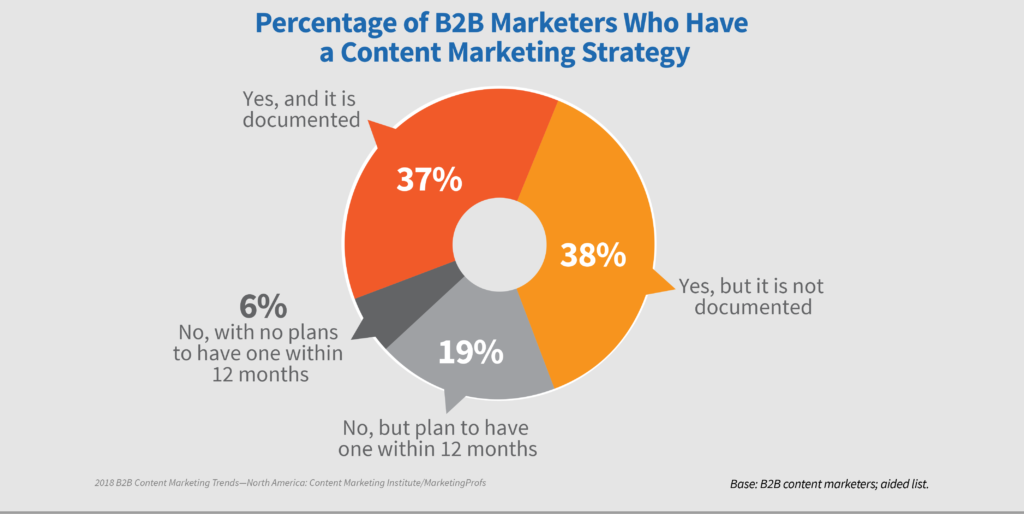
Studies have proven, year after year, that a documented content marketing strategy is critical to success. Only 37% of B2B marketers have a documented strategy, yet 62% of the top performers have invested in one. What’s more, 72% of respondents said that strategy contributed to increased content marketing success over the last year.


Why Do You Need A Documented Content Marketing Strategy?

First, note the word documented. You need to write it down, otherwise it’s just nice ideas. The process of getting a strategy down on paper will help create alignment in your organization. Plus it’s harder to forget something in writing.

But why do you need a strategy to begin with? Here are a few reasons:

You Need to Be Remarkable

There’s a lot of content out there. Every month, WordPress users alone produce nearly 82 million blog posts. Every minute, people send 156 million emails and view  4.1 million YouTube videos.

Whatever you want to say has already been said. Probably many times over.

Your job is to bring your unique story and perspective to the content. You need to answer the question: why should anyone care?

Rand Fishkin of Moz tackles the question by talking about 10x content: the idea that in a world overloaded by content, producing “good” content isn’t enough anymore. You need to create something that’s 10 times better than everyone else.

As Fishkin points out, however, you don’t just do this by accident. 10x content requires planning, research and time to succeed. It needs strategy. Otherwise you are just like one small fish in an enormous ocean.

You Need to Be Radically Relevant to Your Customers

We don’t just produce a ton of content. We also consume a ton of content. Remember those 82 million blog posts per month? WordPress also reports that people view more than 21.3 billion pages per month. So it’s not that your customers aren’t consuming content. They just might not be consuming your content.

The problem is relevance.

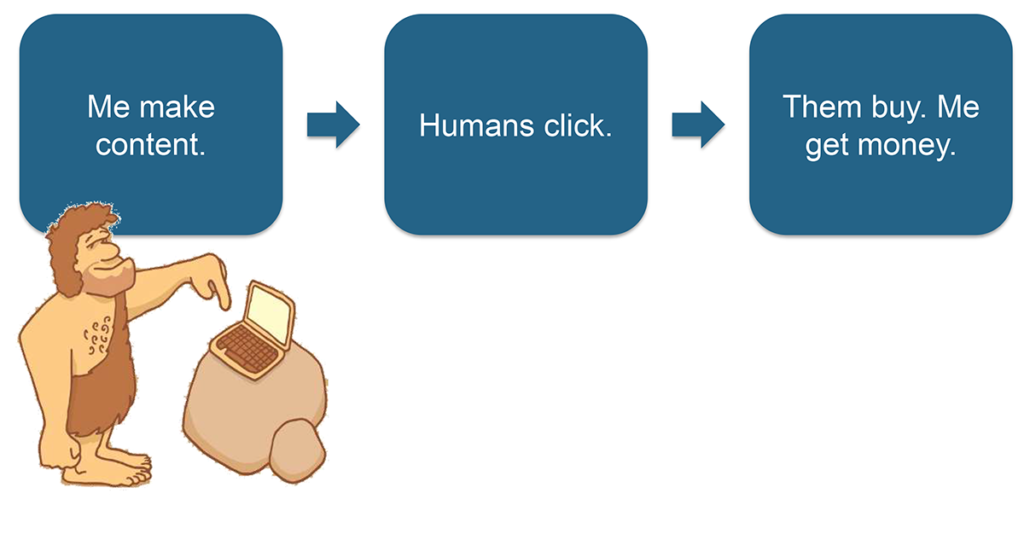
Too many businesses mistakenly assume that if they just create content, their potential customers will immediately see it, love it, and hand over their money. Unfortunately for all of us, it doesn’t work like that. Unless you give your customers a compelling reason to pay attention to your content, they’ll ignore you in favor of a more timely answer, a more in-depth resource, or a funny cat video.

You need to earn the attention of your customers by being hyper-relevant. That’s where your content marketing strategy comes into play. You need to research your target audience so you’re deeply in tune with what they need and how you can answer their questions. By learning where they hang out and how they consume content, you can also plan the appropriate content tactics to reach them in the right place at the right time.

Your Content is Tied to Your Other Marketing Efforts

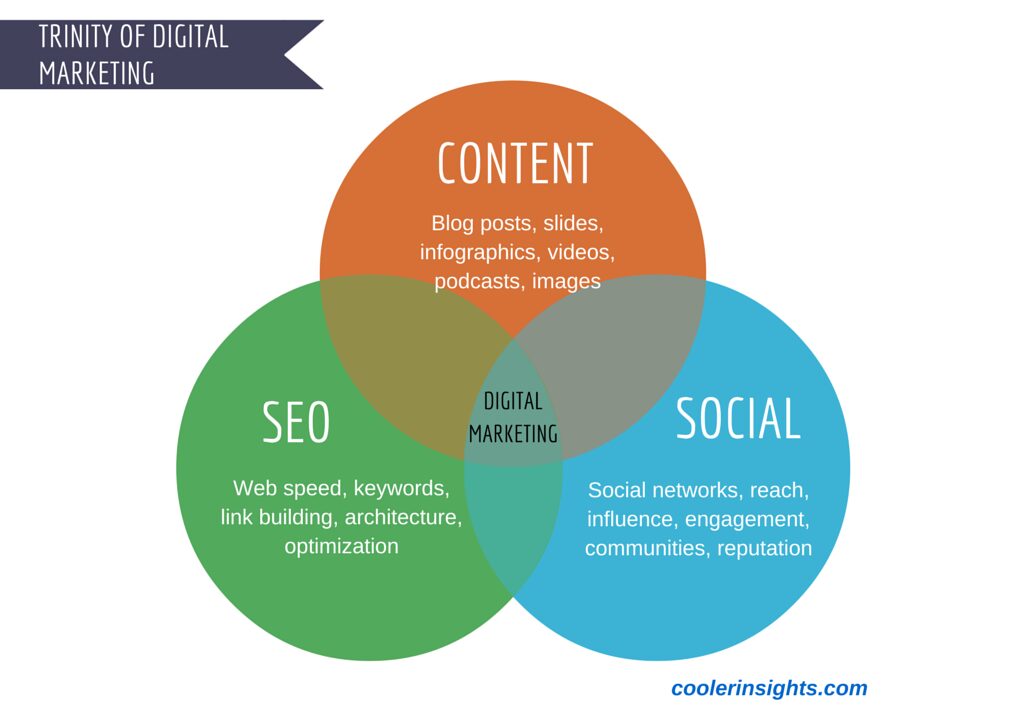
Having a solid content marketing strategy isn’t just about doing content right. It’s about doing all of your marketing right. Content is the substance of message – the stuff your business’s story is made of. You can’t do marketing without content.

Furthermore, content is becoming more and more intertwined with SEO. In fact, it’s now one of Google’s top ranking factors. Google looks for well-written, highly relevant, long-form content when ranking your website. Waxing eloquent about your products and services isn’t enough anymore (because no one wants to read it). You need content that engages and informs your audience. Not only will it rank better, but it will also attract valuable backlinks to your website.

Social media is also driven by content. You use social media to connect and engage with your customers, but content gives you the substance to share and start the conversation. Again, you can’t have a conversation when you only talk about yourself, so you need relevant, non-promotional content.

In both cases, success comes back to having a solid, documented content marketing strategy. Optimized content for SEO and consistent engagement on social media doesn’t happen by accident.

You Need to Know Whether It’s Working

Documenting a content strategy means that you are establishing clear goals for your content, as well as a way to measure them. Without a strategy, it’s easy to fall into the trap of random acts of content that you can’t relate to your business objectives.

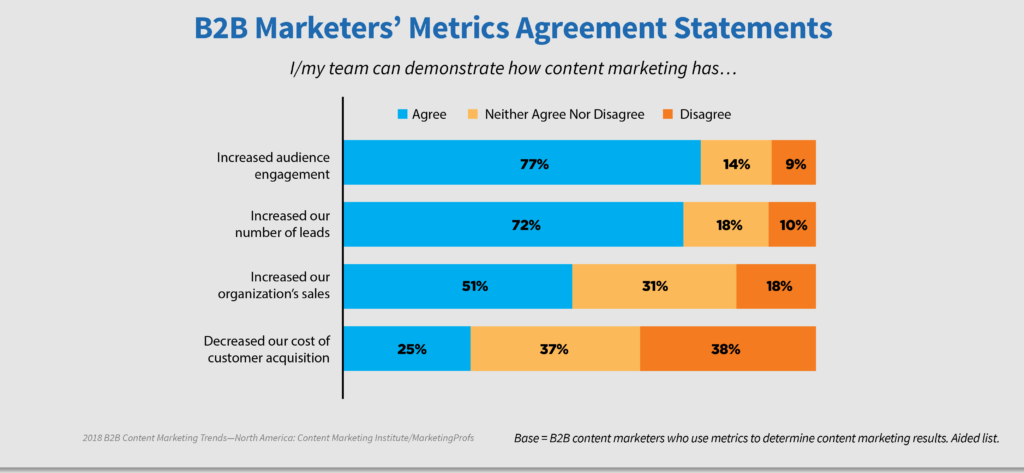
Only 35% of businesses measure the ROI of their content marketing, but those that do have metrics in place typically have positive results to share. 77% reported increased audience engagement, and 72% said they get more leads.

A documented content strategy gives you a roadmap for success so you can identify what’s working and what needs to be improved.

Start Building Your Strategy

If you don’t have documented content marketing strategy, it’s never too late to start! We’ve got multiple resources to help you on your way. First, check out the recording of our recent seminar: How to Transform Your Business with Content Marketing, download our e-book below, or contact us learn more about our expert content marketing services.

Download free e-book - Content Marketing 101

Read more