

This Week’s Question: I have a limited marketing budget. What is the one thing I should do?
Blog

Why You Should Spend More Time On LinkedIn
Have you forgotten about or simply don’t use LinkedIn? This is one of the most important social networks that you should be utilizing, and here’s why!
7 Things You Can Do Now to Improve Your SEO Rankings
As technology continues to change, so do the elements it takes to run your business effectively. Search Engine Optimization (SEO) is an essential part of that evolution, and is necessary in order for your website and your business to rank in searches.
To see the most return on your investment, business owners should be researching and implementing SEO marketing, or hiring a professional SEO company to help. Even once you’ve got the basics in place, there’s a lot more you can do to rise in the search ranks. Here’s a list of steps you can take to improve your SEO marketing and get your business the results you want.
Add Contextual Keywords
Keywords aren’t going anywhere, despite what you might read elsewhere on the internet. But how you use keywords in your content is changing.
Early SEO marketing involved stuffing the same keywords into your content over and over again. Now, having contextual keywords on your webpages is an essential part of SEO marketing.
Contextual keywords – sometimes called semantic keywords or latent semantic indexing (LSI) keywords – are words and phrases that are related to your overall topic. Search engines are now smart enough to know that people use different words to search for the same topic. So Google doesn’t just look at exact-match keywords; it looks at related words to get a deeper understanding of what your content is about, so it can deliver more accurate search results.
For example, let’s say your primary keyword is “SEO,” since that’s what we’re talking about here. You should still optimize your page content around that keyword and include it in your title tags and meta descriptions, H1 header tags, etc. But to give Google a better understanding of what you’re talking about, you would include related search terms like “web page optimization,” “how to optimize your site,” “search engine results,” “keyword research”…you get the idea.
You can find semantic keywords easily by using this handy tool, LSIGraph.
Try Pillar Pages
Pillar pages are closely aligned with the concept of contextual keywords. The idea behind a pillar page is to provide an overview of a specific topic with related subtopics and keywords presented on the same page. So the top portion of your web page design would focus on the main keyword, while the lower portions would incorporate contextual keywords with links to other related pieces of content. Here’s an example of something we did for one of our clients:
Top of Page
On the top of this page, you’ll see words like “personal injury lawyer,” “personal injury,” that establish the core topic for the page. Adding your primary keywords on a pillar page will help Google recognize content much more effectively, especially when supported by the lower half of the page.

Lower Half of Page
Throughout the rest of the web page, we added contextual keywords to complement the primary keywords of the page. Covering subtopics like “slip and fall injuries” or “wrongful death” add context to the page that helps both readers and Google’s search algorithms understand more about personal injury law.

So does adding these contextual keywords work? Absolutely. The rankings for this specific SEO-optimized page far outpaced any of the other standard pages during our tests on this site. Also keep in mind that “personal injury” is a competitive term when it comes to searches.
Don’t Be Afraid to Test
If you’re launching a new product, you don’t just throw it together and ship it out to the masses, right? You test it, most likely several times, before you even let anyone see it—the same goes for web pages.
How are you going to know what works and what doesn’t unless you really test it out? And we don’t just mean changing a few words or the color of a button. We’re talking about at the page level itself.
For example, why not make one page that focuses on long-form content while creating another page with a pillar design? Create the pages, put them on your site, and let them sit in place for a month. After some time, take a look at your analytics and see: Which page is getting the most impressions? Which page has fewer exits? Which page is viewed longer? Which page gets the most shares?
Looking at these analytics will help you determine which pages are working best for your business. You can also experiment with your approach to SEO on each page. Then, with real-world data in hand, you can refine your design and SEO marketing approach to get better results.
Don’t Be Afraid to Write
In the world of SEO marketing, the more content you have, the better. If you think you’ve written enough, write more.
Despite claims that people have short attention spans and don’t read, searchers actually like long-form content. The average word count of a first page Google result is 1,890 words, according to a study by Backlinko that analyzed over one million search results.
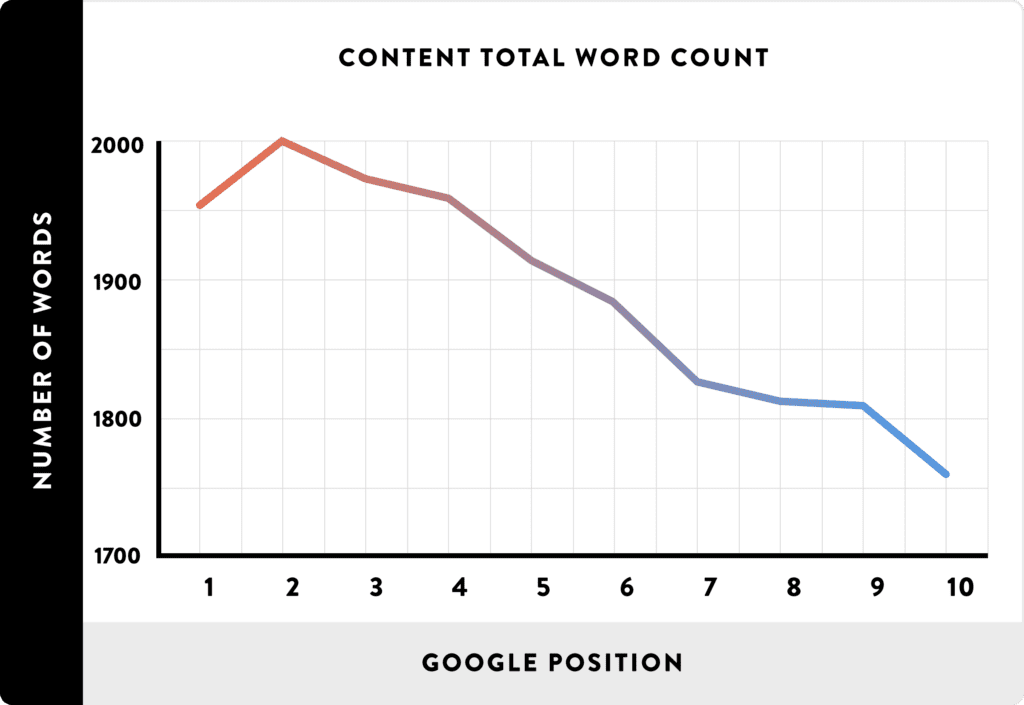
Longer articles rank well because they let you cover a topic in more depth, and your readers don’t have to go to multiple sources to find an answer. So go ahead and write 2,000 words, as long as you’re writing something that’s relevant and helpful to your audience.
10 Words are Worth One Picture
Have you ever heard of an alt tag? Better yet, do you include them on your website religiously?
An alt tag is an HTML tag that is used to add text descriptions to images. They’re designed to accommodate web accessibility. A major side benefit of alt tags is that give you roughly 10 words of added, valuable SEO content to your website. Google can’t read images, so it’s your job to explain what’s in each picture on your site.
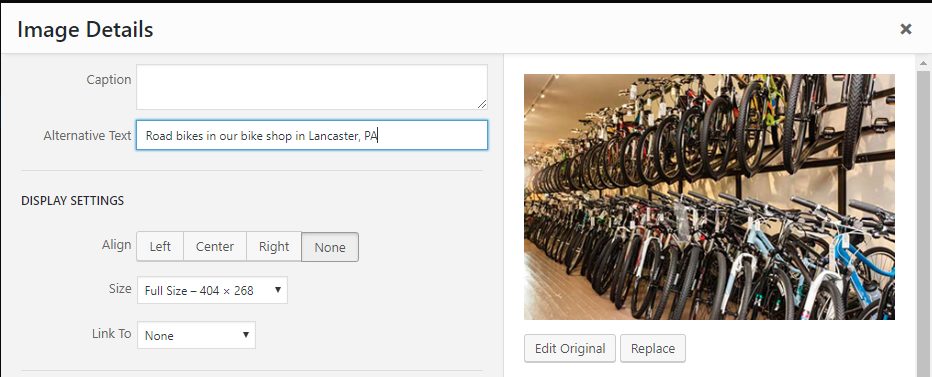
When writing an alt tag, make sure to be descriptive and specific. Describe what the image is about, but also layer in your keywords. Here’s an example of a good and bad alt tag.
A Weak Alt Tag
“Picture of bikes on a wall.” — Never waste your time using the word ‘picture’ in your alt tag. Google already knows it’s an image. Describe what’s in the image instead.

A Strong Alt Tag
“Road bikes in our bike shop in Lancaster, PA.” — See how easy it is to include your keywords or semantic keywords in the alt tag? In this case, the alt tag describes the image, but also includes keywords like “road bikes” and “bike shop” and includes a geo-location reference.
It’s easy to update your image alt tags – no developer support required! If you have a WordPress site, just log in and go to the image you want to add an alt tag to. From there, just enter your alt tag in the Alternative Text block and hit save. You’re done!
Make It Local
Another easy way to improve your rankings, especially for local SEO marketing, is by geo-locating your content—including your metadata. So if your business is in Lancaster or Harrisburg or York, let people know that. Tell them in your site text. Make sure you include a footer on every page with your address and local phone number. You can even add a Google Map to make it easy for them to find you.
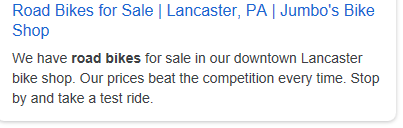
Apart from your website text, make sure you include your location in your page title and meta description as well. Start with your keyword, but make sure you insert your location. Your location is even more important than your company name. If you geo-target well, a title tag should look something like this:
Make Your First Link Count
Finally, get familiar with the “First Link Priority” Rule and follow it. The rule is: if you include two links on a page that both point to the same page, Google will only pay attention to the first link. So for example, let’s say you have a link in your main navigation that goes to your product page. If you place another link farther down the page, Google won’t recognize it. This rule was put in place to avoid making spammy links just to include different anchor text.
It’s a big reason why you should use keyword-specific links in your top-level navigation. How many times do you see a generic “products,” link rather than a specific keyword like “custom furniture” that would be more informative? Even if you included a “custom furniture” link later on the page, Google would only see the generic “products” link in the header, because it’s the first one on the page.
Well, there you have it. Seven ways to improve your search rankings, and most without the need for a designer or developer. With any SEO marketing, the key is to implement, test, and adjust. There are no guarantees, but if you’re diligent and keep working at it, you’ll see results.
As a local SEO company in Lancaster, PA, we’re very familiar with making these types of changes to website designs and many of our clients have seen rankings go up noticeably in 30 days. However, it can take much longer to see results, depending on the competition in your industry. Just stay the course, keep making improvements, and let us know if we can help you along the way!


What is GeoFencing? Powerful Location-Based Marketing [Infographic]
Geofencing marketing is a type of digital marketing where you put a virtual perimeter around a real-world location in order to serve targeted mobile ads.
It’s a way for your small business to reach people where they’re spending more and more time: their mobile devices. Location-based marketing is a powerful tool to attract nearby customers to your business, target your competitor’s customers, and even recruit local employees.
But how does geofencing marketing work, and why is location-based marketing important for your small business?
Take a look at our infographic below to learn more!


Top 7 Reasons You’re Not Ranking on Google
Let’s face it: SEO marketing is complex. Thousands of small businesses like you are trying to figure out why they’re not showing up in Google search results. After all, everyone wants to rank on the first page of Google.

5 Top Questions to Ask Before Hiring an SEO Company
In the ever evolving world of SEO you need a team you can trust to stay on top of things, here’s how to find one.

How to Improve Website User Experience – 3 Real World Examples
When people come to your website, do they want to stay, or are you scaring them away? In this post, we talk about what makes a good website user experience.
The Best SEO Tools for Your Website
When it comes to promoting your business, search engine optimization (SEO) is one of the most important ways to drive traffic to your website. Most people think of SEO marketing as just a matter of stuffing keywords into their web pages, but it has become much more than that. As Google and other search engines keep updating their algorithms, the process of optimizing a website design for organic traffic has evolved into something more complex.
While SEO marketing can seem daunting, it’s actually not difficult to do once you know what to look for. However, it also doesn’t have shortcuts and requires time and experience to do well. Luckily, there are plenty of SEO tools out there to help you optimize your website. We’ve organized a few of these tools in this post to help.
Keyword Research Tools
Keyword research is probably the part of SEO marketing that most people are familiar with. It involves finding the right search words and phrases that your customers are entering, as well as making sure your company can rank well for that search. Having a grasp on keyword research will not only help you better understand your customers, but it will also give you a better view of your audience as a whole.
Google Keyword Planner
Keyword Planner is a handy feature within your Google Ads account and is completely free to use.
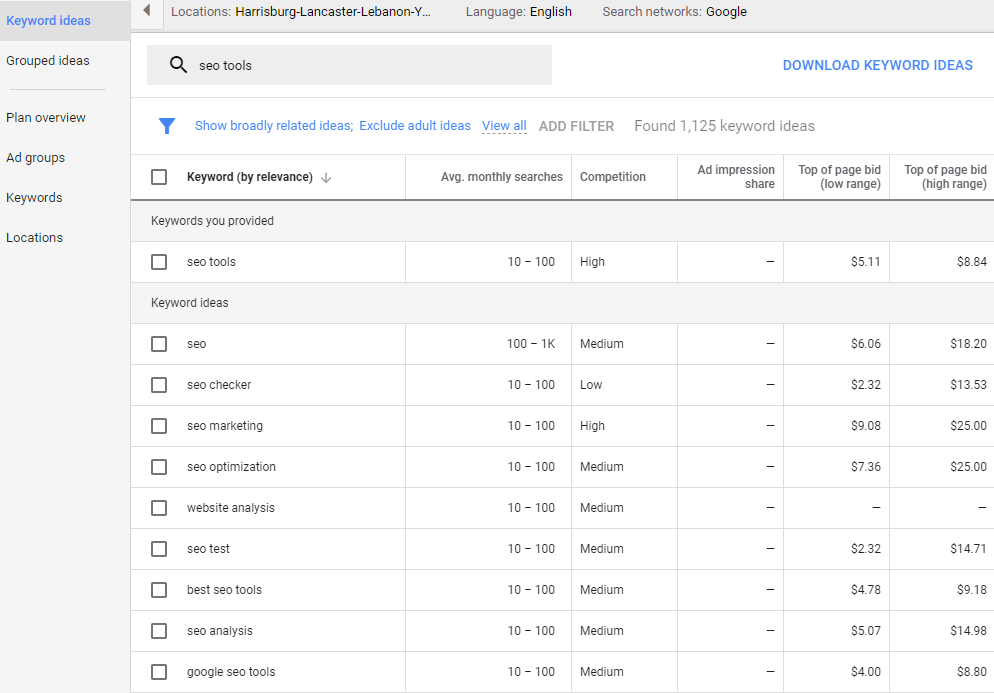
With this tool, you can plug in keywords that you think your audience is searching for. Google will then tell you how often that term is searched on average each month, how much competition is surrounding that keyword, and how much your competition is paying to place ads for that term. It will also give you a list of related keywords that you may want to look into as well.
One of the best aspects of Keyword Planner is that the information is coming straight from Google, so you know it’s going to be accurate. You also have the ability to narrow your results by location to better optimize your research. So if your local business wants to know how often people are searching for “emergency plumbing repair” within the Harrisburg/Lancaster/York area, it’s only a few clicks away. Plus, who doesn’t love a free tool?
Ahrefs Keyword Explorer
Ahrefs has several useful tools, a few of which we’ll discuss later in this post, but for now we’re looking at one in particular—the Keyword Explorer.
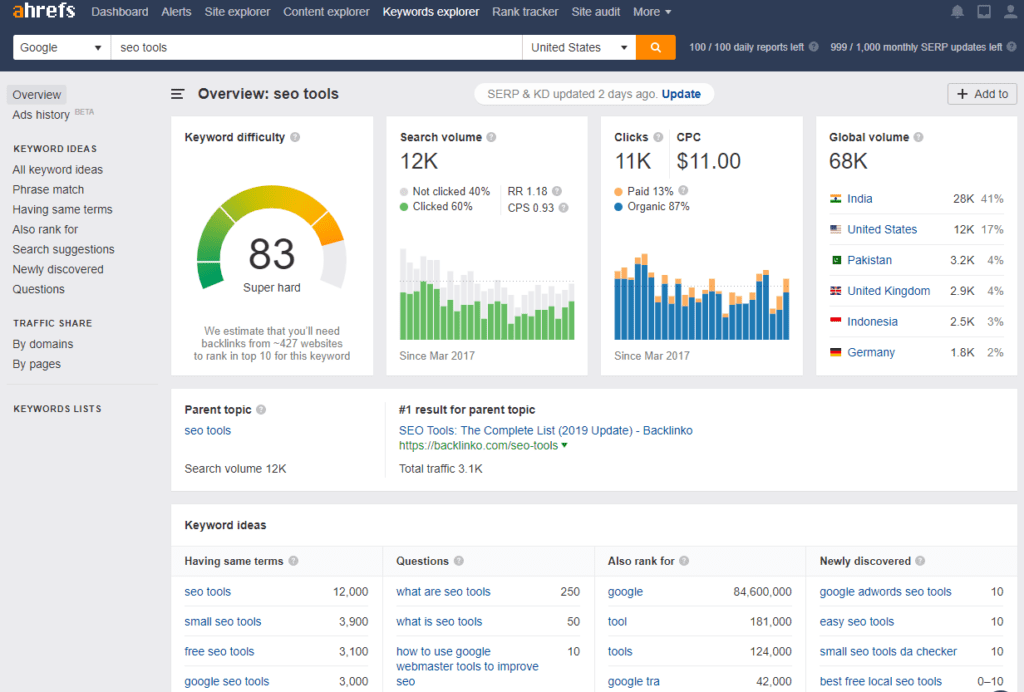
The Ahrefs Keyword Explorer is a great tool for taking a deep dive into keyword data. While numbers and analytics can be overwhelming at times, Ahrefs has its dashboard organized in a way that any local business owner is easily able to understand. Not only do you get to see the search volume of keywords, but you can also see what questions people are asking, the average cost per click for advertising, related keywords, and the top search engine results.
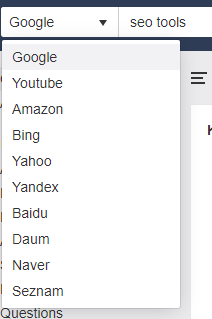
With its latest update, Ahrefs has also included search results for more than just Google. Now you can look at how often people are searching terms within Bing, Yahoo, YouTube, and even Amazon! This can be a great tool for businesses that work with consumer products that may be sold or advertised on these sites directly.
Unfortunately, all of this data does not come free. One of the downsides to this tool is that it is not cheap; Ahrefs’ least expensive plan starts at $99 per month. If you want to be able to take a deep dive into reports, you’ll want their “standard” plan, which will run you $179 per month. That being said, Ahrefs is one of the most powerful and useful SEO tools on the market and may be well worth the investment.
SEMrush
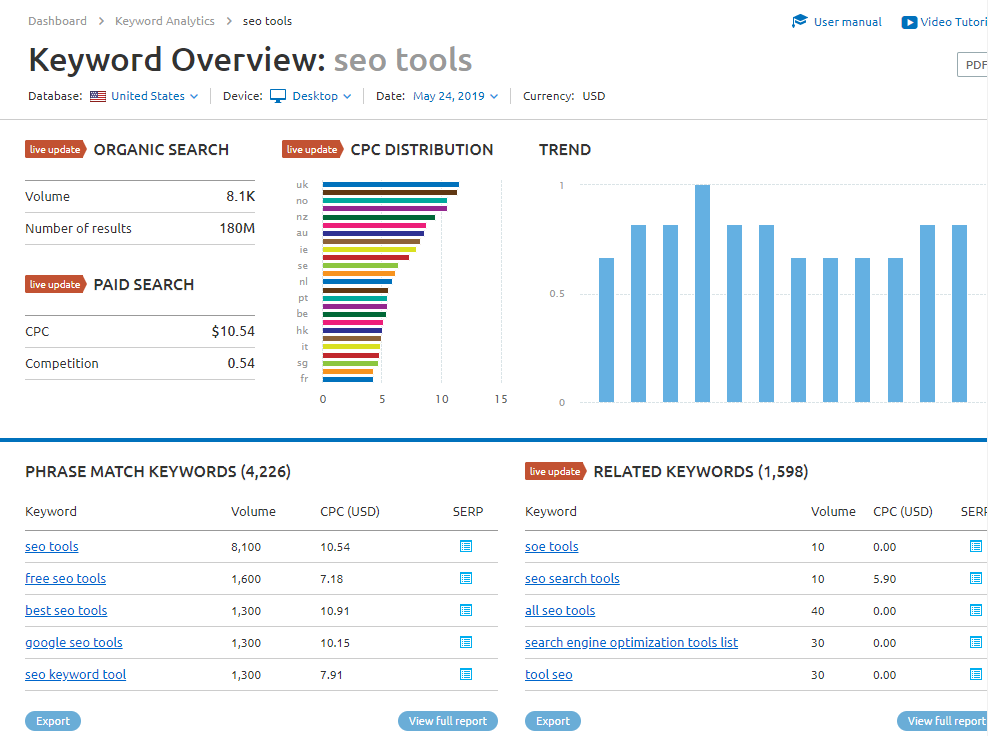 The next SEO tool we love is SEMrush. Like the other tools we’ve mentioned, SEMrush gives you a report of the search volume for the month, related keywords, and how much competitors are paying for ads. What makes SEMrush stand out from some of the other tools is its capability to show live results of the ads your competitors are using. This makes it easy for you to capitalize on an ad that you see is doing well and have a fasterturnaround on your own ads.

SEMrush is a paid tool that has its starter plan at $99 a month. This plan also includes access to the expansive array of other tools that SEMrush offers, which we will talk more about a little later. It’s these other tools, combined with its SEO capabilities that make SEMrush so powerful.
Answer the Public
Answer the Public (ATP) is another tool for finding what your target audience is searching for. By simply typing in your term, you’ll get back every conceivable question people are asking on search engines. This is especially useful when you’re trying to come up with blog ideas for your content marketing.
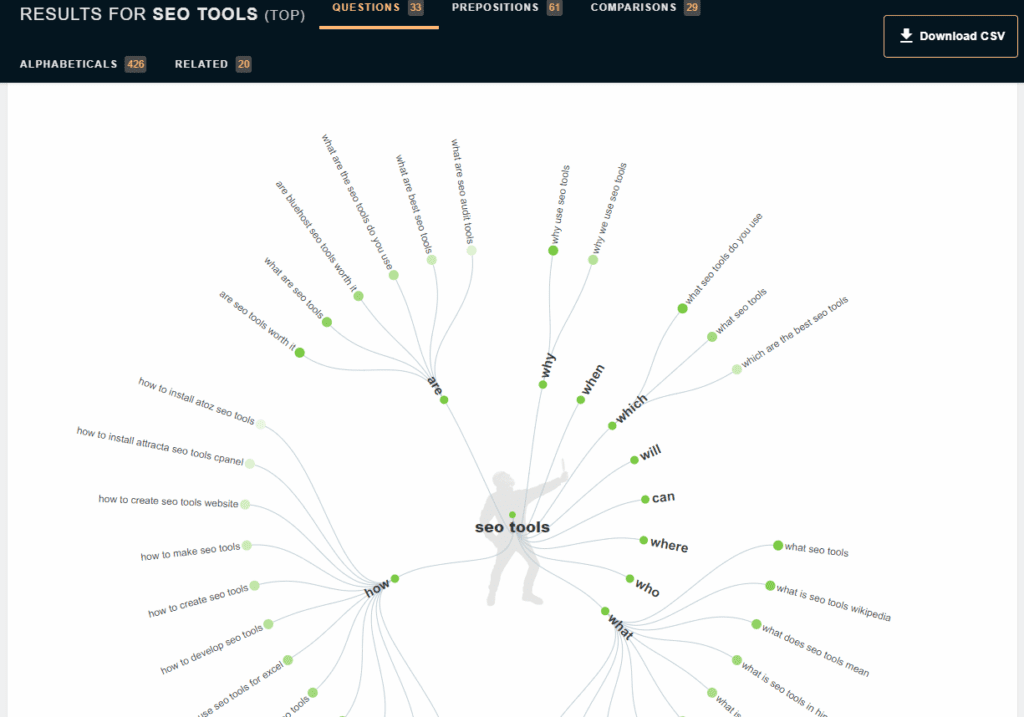 The good news is that ATP is free for you to use up until a certain point. The bad news is that you only get a limited number of free reports each day before you have to pay for a pro plan ($99 a month). The ATP tool also does not give you search volume, so it’s difficult to know which questions are the more dominant ones that your audience is asking.
Site Audit Tools
Now that you know what keywords you want to track and rank, you need a method for tracking your website’s overall ranking. At EZMarketing, we use several tools to track how a website is ranking for target keywords, what technical issues may be harming those rankings, and what opportunities exist for future improvement. Keep reading for a few of the more popular options.
Ahrefs
We’ll start by coming back to Ahrefs. Their site auditing analysis tool gives great insights for any website and doesn’t require any integration with your website coding. That means you can run this audit on your competitors too and see the following:
- What keywords they are ranking for
- How well they’re ranking
- What pages are getting the most traffic
- What other websites are linking back to them

This is just a snapshot of what Ahrefs gives you, but you can also drill down into each section for more data.
Ahrefs also has a Google Chrome extension that you can download to run this information as you surf the internet, which is incredibly valuable for assessing your competitors on the fly.
SEMrush
We mentioned earlier that SEMrush’s array of assets makes it a very powerful tool when it comes to analyzing SEO marketing. Their site auditing tool is probably one of SEMrush’s most powerful capabilities. We recommend connecting your Google Analytics and Search Console accounts, which will get you the most accurate data possible. Once you have it set up, you’ll know exactly what technical SEO issues your website has.
Here’s a snapshot of what the audit looks like:
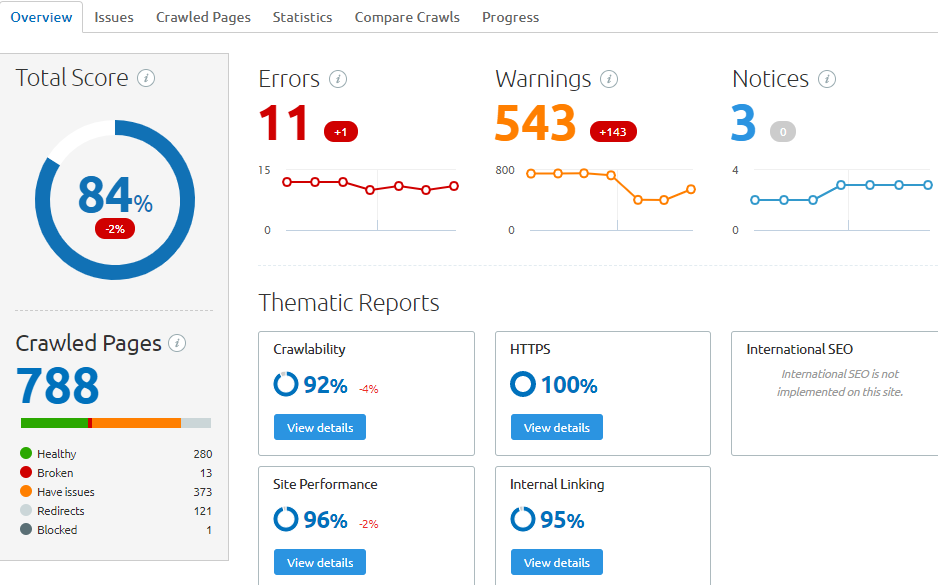
This shows all of the areas that you can address to help your website rank better. We also utilize SEMrush’s Position Tracking tool to monitor how a website is ranking for the target keywords that we’ve outlined and deemed most important.
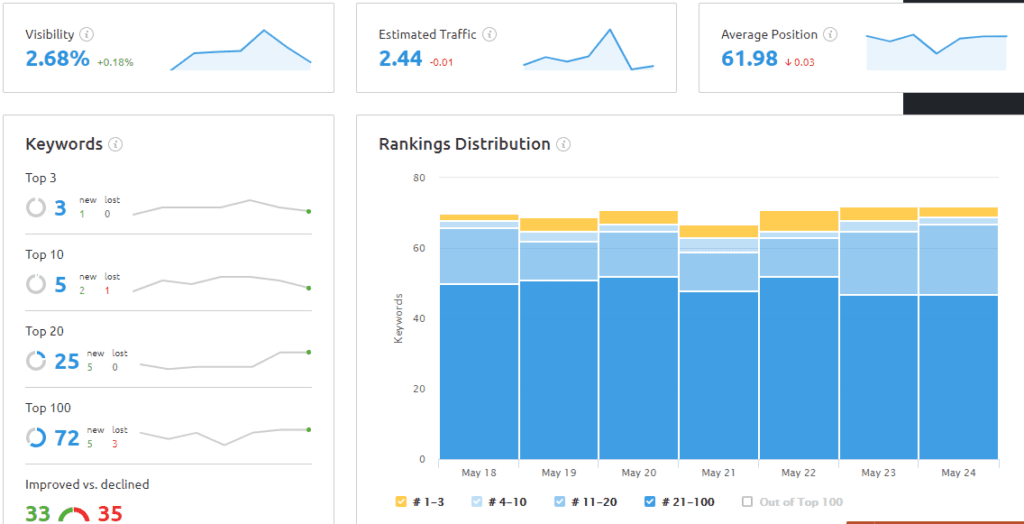
With this tool, we can see how rankings compare to competitors’ and what estimated traffic we can expect from organic results.
Yoast SEO
If you have a WordPress website, Yoast is a helpful plugin you can use for site auditing. Arguably, it’s the number one onsite SEO plugin available. The plugin will analyze each individual page compared to a target keyword you specify and provide recommendations for optimizing that page. Everything from needing more keyword density, to technical issues like alt text for images, meta tags, and meta description, will be analyzed by Yoast.
Google Analytics
If your website doesn’t have analytics installed then you’re missing out on one of the most important free analysis tools available—Google Analytics. This tool is very easy to incorporate into your website and puts all your key website metrics at your fingertips. And if you’re concerned about not knowing how to use it, there is an entire academy to teach you.
Google Search Console
Google Search Console (GSC) is another free tool that every website should use. With GSC, you can see what search terms people are actually using to find your site and how well you’re ranking for those searches. GSC is also great for site auditing because you can see how well your pages are performing in search, and which ones are getting people to click through to your website.
Backlink Audit Tools
Analyzing your backlink profile is a commonly overlooked aspect of SEO. You may not know it, but backlinks can have a huge impact on how prominent your website is in searches. If you have spammy backlinks, Google will even penalize your ranking. So even if you’ve heard of link-building as an SEO tactic, there is so much more involved. We’ve put together a list of backlink audit tools to help you with this process.
Ahrefs
Once again, we’re back to looking at Ahrefs. The backlink data within Ahrefs will show new links your website has gained, as well as which links have been lost, and any that are broken. While all of this is useful, we find that the most helpful aspect of Ahrefs is its link intersect tool. The link intersect tool allows you to compare the backlinks of your website to your competitors; the tool then tells you what websites are linked to your competitor and not to you. This gives you a great starting point of who to reach out to improve your backlink profile.
SEMrush
Going back to SEMrush, we have the Backlink Audit tool. This lets you analyze your new links, broken links, and gives you a task list of what they call “toxic” backlinks.

As we mentioned before, these bad links could be harming your ranking authority. Identifying them allows you to go back and disavow them in a search console (i.e. tell Google you don’t want these links to count toward your ranking).
Google Search Console
Another useful tool for backlink auditing is GSC. In GSC, you can examine what pages are getting the most backlinks and what external websites have given you the most backlinks. It’s also where you can submit your disavow list, telling Google to ignore harmful links that someone else has created to your site.
Mobile-Friendly Testing
In a world that’s constantly becoming more and more mobile, optimizing mobile SEO for your website is a necessity. Think about it—how often do you view websites only on a desktop computer, and not on your phone? The answer is probably not too many. As more and more web traffic comes from smartphones, both your users and search engines expect your website to work well on mobile devices. You’re doing yourself and your business a huge disservice if your website isn’t mobile friendly.
If you’re using any of the tools above to optimize your website, you are already heading in the right direction for your mobile site. We recommend the following when it comes to keeping your mobile SEO marketing in top notch shape:
- Use Responsive Web Design: People are looking at your website not just from their smartphones, but also from tablets, notebooks, and many other sizes of devices. Designing your mobile site to be responsive to these various sizes will make for a better user experience.
- Avoid Using Flash or Pop-Ups: Flash plugins may not work on your customers’ phones, so sticking to HTML5 is likely the better route. Also, pop-ups (no matter how popular they are), can be difficult and frustrating to use on mobile sites. Assume most people are going to have trouble clicking on small links, so having buttons be larger will make things easier to navigate.
- Make Sure Your Web Speed is Up to Par: Most web designers already know they should compress images and optimize them for web viewing, but this is especially important for mobile users. Google will rank websites based off of page speed, so make sure you minify code, reduce redirects, and take other steps to clean up your mobile site.
Site Speed Tools
As we just mentioned, your site speed has a dramatic effect on your SEO marketing efforts. Basically, the slower your site is and the more frustrated the user is, the less Google will trust your website. As a result, Google will penalize your website and drop your page in rankings. These are just a few of the tools we recommend to help you minimize those efforts:
- Google PageSpeed Insights: This is a free Google tool to help you find and resolve issues that are hurting your site speed. This tool will analyze the content of your web page and generate suggested improvements to increase its speed.
- Pingdom Speed Test: Pingdom is another free tool you can use to analyze your website for what could be slowing your speed. If your site is too big, slow, Pingdom makes it easy for both novices and experts to utilize its tool for bettering website performance.
Google Mobile-Friendly Test
Once you’ve taken the steps to make your website mobile friendly, we recommend testing out your website for mobile responsiveness. Google has created a helpful website tool called Mobile-Friendly Test, which scans your website and gives feedback on how to improve it. It’s a simple and free tool to help you check if all of your hard work paid off.
Here at EZMarketing, we understand how overwhelming all of this content can be. We’ve only mentioned a few of the many tools you can use to help your SEO marketing, but if you’re overwhelmed, feel free to reach out to our SEO company. We’ll gladly help you in your SEO services and get your business found on search engines!


Best Practices for Awesome Social Media Content
Are you unsure what you should post on social media for your business? Check out our tips and best practices shared by our social media experts.
Choosing the Right Social Media Platforms for Your Business
Diving into the realm of social media marketing can be a daunting task, but with over 3.4 billion active social media users worldwide, it’s now a necessity for most businesses to include in their marketing strategy. From Facebook to LinkedIn to Pinterest, each social network has its own uses when it comes to promoting your business online. The main question you may be asking yourself is, “Which social media platforms are best for my business?”