Blog


How to Stand Out with a Unique Selling Proposition

In a crowded business world, it can be tough to stand out from your competition. Generic claims like ‘best quality,’ or ‘great customer service’ won’t cut it. Find out how to differentiate your business with a strong Unique Selling Proposition (USP).

The Time-Starved Marketer’s Guide to Easy Buyer Personas

Buyer personas: two words that can strike fear into the hearts of many marketers. The trouble is, a good buyer persona takes significant time and effort to put together. That may be all well and good for a large company with a robust marketing team, but faced with the daunting task of customer interviews, extensive research, and translating all that data into usable personas, busy marketers are tempted to skip the step entirely.

So is there a better approach that allows marketers to gain useful insights about their customers, without getting lost in the depths of endless customer research? We think so.

What is a buyer persona?

A buyer persona is a generalized representation of your ideal customer, based on actual customer data, that helps you better tailor your marketing strategy.

Buyer personas help you dive deeper to understand who your customers really are and what motivates them. This helps you focus your digital marketing, so you’re speaking directly to your customer’s needs and pain points. Because here’s the harsh truth: no one cares about your products or services unless you give them a reason to. A good buyer persona helps you uncover what your customer truly values.

Why bother with buyer personas?

When it comes to putting together a marketing strategy, most marketers will agree that identifying a target customer is important. But why invest so much time and effort in developing buyer personas?

First, creating buyer personas implies a shift in how you think about your customers. If you’re simply trying to identify a target market, you’re probably identifying who you think is best-suited to your products or services. Building a buyer persona means you’re putting yourself if your customer’s shoes, so you’re responding to what they want and need.

Furthermore, when most businesses talk about their ideal customer, they are focusing on a collection of demographics. While demographics may narrow down your audience, they aren’t as much help when it comes to creating strong, differentiated messaging.

For example, a beauty salon might say they’re targeting female professionals, ages 25-35, who are married but have no children, and have a household income of greater than $80K. Does this tell you something about their ideal customer? Absolutely. But does it tell you whether they’re interested in the newest styles and fashion trends, or if they’re looking for efficient in-and-out haircut? Not so much.

Target Market vs. Buyer Persona

Source: VIEO Design Slideshare

Buyer personas are more than just a target market. They go beyond demographics to identify your ideal customers’ desires, challenges, and values, so you market differently to different types of people.

Your customers expect that sort of personalization. Whether your business is B2B or B2C, all marketing is person to person. The more you can understand and empathize with your customers, the better you can authentically reach them like a real human being.

How to build buyer personas that don’t take forever

Focus on the information that really matters

Sometimes marketers become so over-zealous in seeking to understand their customers that feel they need to know every single detail about their lives. Unfortunately, that means they often waste time collecting irrelevant data. We’ve seen interview questions that are so detailed they just get creepy (things like “what kind of parenting style did you grow up with?” or “were you a loner in school?”).

Remember that personas are generalizations. Unless you’re personalizing messages for every single person, you want to look for commonalities between individual customers that you can apply to a larger group. You don’t need to know intimate details about their personal life, or what their favorite breakfast cereal is. And unless you’re in a retail B2C business, traditional demographics like someone’s gender or marital status likely aren’t that important either.

If you have any doubts about whether something is relevant, ask yourself two questions:

  • Does this substantially change how my customer makes decisions?
  • Am I going to differentiate my marketing message based on this information?

Use a simple buyer persona template

While every business is different, and you may want to adapt this to your specific needs, here is the basic template we use for our buyer personas.

Keep in the mind that the questions you ask in each of these areas should be skewed toward the product or service you’re selling. If you’re in a B2B business, you’ll probably focus more on your customer’s professional life and how they evaluate business solutions. If you’re selling B2C, you’ll want to ask more about their personal goals and pain points.

  • Overview
    • Name
    • Job title/function
    • Basic demographic info (age, income, education, location)
    • Background information (other relevant information like industry, experience, interests, hobbies)
  • Day in the Life
    • What does a typical day look like?
    • What are they responsible for? What kinds of decisions do they need to make?
    • Who else do they interact with in making decisions?
    • What do they dedicate their time, effort and/or money to?
  • Goals
    • What do they want?
    • What does success look like for them?
    • What tools, skills, or resources do they need to achieve their goals?
    • What do the value most in a product/service like yours?
  • Problems
    • What keeps them up at night?
    • What prevents them from achieving their goals?
    • What frustrates them most about the product/service area you’re addressing?
    • What do they try to do to alleviate those frustrations?
  • Questions/Objections
    • What information do they need in order to make a decision?
    • What are the most important factors they look for in evaluating a solution?
    • What would prevent them from buying your product/service?
  • Content Preferences
    • How do they get information? Do they prefer certain channels or formats?
    • When do they consume content? During the work day, or at home?
    • How much communication do they want to receive, and how often?
    • What sources do they trust?

To download a copy of this template, click on the link below.

How to research your buyer personas

Even if you’re crunched for time, you still need to invest the effort in doing research. If you want your buyer personas to be useful in guiding your marketing strategy, you can’t rely on guessing or making things up about your customers.

The best way to research your buyer personas is to talk to your buyers. Unfortunately, busy marketers don’t always have the time to conduct in-depth customer interviews. If you can invest the time, by all means, do it. If not, here are some quick tips to help you research your personas:

Talk to your sales team

Your sales team is on the front lines when it comes to interacting with customers during the decision-making process. Pick their brains about the how and why different people choose to become customers. Ask questions like:

  • What kinds of different prospects do you interact with?
  • What are the top most frequently asked questions you get from customers?
  • What are they looking for from a solution like ours?
  • Why do customers choose our solution over others?
  • What common objections do you get from prospects?

Talk to your customer service team

This is one source marketers sometimes overlook. While your sales team might know the most about the decision-making process, your customer service team is most familiar with the ongoing successes and pain points with your current customers. They can have tremendous insight into what your customers find important. Here are a few things you can ask them:

  • What are the most common complains you hear from our customers?
  • What do they like the most about working with us?
  • Who are our best clients? Why?
  • Who are our worst clients? Why?

Mine your analytics

Check your analytics from any source you’re using for marketing: website, email, social media, or your CRM system, if you have one. What types of content are your customers looking at, or engaging with? Are they downloading certain pieces of content? What pages are your website visitors looking at, and what sources did they come from? Look for patterns that identify what information your customer finds interesting and relevant.

Ask for customer feedback in other ways

While not as efficient as knocking out your questions in an interview, you can get direct customer feedback in other ways. Develop a survey, and send it out via email (but note that you might need an incentive to get responses). Or, add an extra field to your online forms to ask customers about their biggest challenge, or their #1 priority when it comes to your product/service.

Use external sources

There are tons of places online where your customers might share information you can use to develop your buyer personas. Check questions sites like Quora or Yahoo answers for problems your inquisitive customers might be asking about. It might sound stalker-ish, but Facebook and LinkedIn are great places to learn about your customers – people share an enormous amount of information about themselves on social media. Look for industry blogs, and competitor’s content to learn about what others in your space are talking about. Depending on your business, you might even find that sites like Reddit have interesting discussions you can follow.

Next Steps

Buyer personas don’t need to be a source of fear or anxiety. Using our template or your own version, just start filling in information as you go. You’ll discover quickly that you’re identifying more about your customers than you ever knew.

If you need help in identifying your buyer personas for your business, we can help! We offer a variety of digital marketing services and we can assist you in developing your buyer personas to help build and grow your business.

Start A Conversation

Read more

How to Write Good SEO Title Tags & Meta Descriptions

When it comes to Search Engine Optimization (SEO), you don’t just want to rank highly on search results. You also want people to click through to your website. Good title tags and meta descriptions are incredibly important to SEO marketing and enticing searchers onto your website.

What are Title Tags and Meta Descriptions?

Title tags and meta descriptions are the headline and summary that appear on a search engine results page (SERP). They help tell both people and search engines what a specific web page is all about.

EZMarketing-title-and-meta-description-example

Like it sounds, the title tag is a piece of code that identifies the title of the web page. The meta description is a short summary of the page’s content that appears under the title in search results. Both elements show up in the header section of the HTML code for your website, which might look something like this:

Title tags also appear on the top of your web browser to help you identify which page you’re on. They’re especially handy if you like to browse with multiple tabs at once.

EZMarketing-browser-title

While technically only the title tags are part  Google’s ranking algorithm, both are important for SEO marketing. Good titles and descriptions improve the user experience and entice users to click through to your website from search engine results. This in turn shows the search engine that your content is relevant and interesting.

How to Write Good Title Tags & Meta Descriptions

Watch the length: not too short, not too long

Your titles and descriptions should be long enough to contain all your important information, but short enough to display fully without getting cut off. Like Goldilocks, you want them to be “just right.”

For title tags, that sweet spot is between 50-60 characters, according to Moz. Google will sometimes display more characters than that, but it depends. The exact limit is 600 pixels, but because some characters are wider than others (like an “M” vs. an “i”), you may fit as few as 40 or as many as 80.

Google has made a few changes to the length of meta descriptions recently. In December of 2017, they increased the limit from about 155 characters up to about 320 characters. In May 2018, they reduced the length back to 155 characters for desktop, and about 130 characters for mobile.

If you’re still using long meta descriptions, it’s not the end of the world, but we recommend optimizing for the first 110-130 characters.

Avoid duplicate titles & descriptions

Duplicate content is a big “no-no” for search engines, so the same rule applies here. Plus, by using unique titles and meta descriptions for each page, you reinforce to search engines that your content is unique and valuable.

Duplicates often occur when you forget to set your titles and descriptions, and the page simply uses a generic default. “Untitled,” and “Just another WordPress site” are not good titles to encourage users to click, so make sure you make them unique.

duplicate-meta-title-description-example

Include relevant keywords

You need to make it clear to both users and search engines what your page is about. To do that, make sure you include keywords that relate to the topic or subject matter of the page.

Worley-meta-title-description-keywords

For example, when searching for “Propane Lancaster, PA,” this listing from Worley & Obetz includes multiple relevant keywords, like “propane gas company” “tank refills” and “delivery.” In this case, Google actually expanded the provided meta description to add details about geographical coverage areas.

Don’t keyword stuff

While you want to include relevant keywords, don’t go overboard. In the early days of SEO marketing, you could stuff as many keywords in your title tags and meta description as possible, and search engines would rank you for those terms. Now, search engines have learned to penalize this behavior, which feels forced and “spammy” to users.

In fact, Google is smart enough now to understand related terms and concepts, even if you don’t use the exact same keywords as the searcher. For example, you search for “HVAC repair,” Google knows that terms like “heating” and “air conditioning” are related. So write naturally to describe the main subject, and don’t obsess over fitting in every single keyword.

Put the most important words first in title tags

Studies have shown that people tend to focus on the first 2-3 words of a headline. It makes sense: we read left to right, and many people skim text, rather than reading it completely. Plus, long titles may get cut off and omit important words at the end. So your titles are more likely to make an impact if you include the most important words first.

In addition, keywords closer to the beginning of the title tag may also have more impact on search rankings, according to Moz.

Include your brand name in title tags

People often like to know where content is coming from, so it’s good to include your brand name in your title. Plus, it also gives you credit for your content and builds brand recognition just by showing up on SERP pages, even if users don’t click the link. Google will, in fact, sometimes add your brand name automatically if you don’t already have it, because they know it’s important.

Generally, you should add your brand name to the end of your title tag, typically separated by a | pipe. It should look something like this:

Primary Keywords – Secondary Keywords | Brand Name

The exception is your homepage, where your brand name should come first.

Entice users to click

Your page titles and meta descriptions are like a sales pitch for that web page. Think of them like an ad, and write compelling copy that gets people to click. That means speaking to users’ needs, identifying the benefits of what the page has to offer, and including compelling, active language.

Kreiders-meta-title-description-ad-copy

Take this example from a local farm. It highlights the unique benefits of the company’s lactose-free milk product and includes a call-to-action to get an online coupon.

Write for people

Too often, businesses are so focused on optimization and trying to climb in the rankings that they forget their website needs to speak to real people, not just robots. Search engines are getting smarter every day, and they’re increasingly learning to love what people love. When it comes to SEO writing, write for people first. Optimize for search engines second.

Google May Not Use Your Title Tags & Meta Descriptions

Here’s an added complication: Google doesn’t always use the title tags and meta descriptions that you set. If  you aren’t following the best practices above, Google may come up with its own information to display in search results.

Even if you are writing good titles and descriptions, Google may still choose to change what displays to better fit the user’s search query. This is generally a good thing, but it can be frustrating when you can’t force them to use a your information.

To check your title tags and meta descriptions, we recommend using Google’s Webmaster Tools (look under Search Appearance –> HTML Improvements), or an SEO spider tool like Screaming Frog.

Website optimization is key in order for your website to rank well. Our SEO company knows all the technical ins and outs that speak to search engines, such as title tags and meta descriptions. We offer on-page SEO services that will ensure your website is search engine compatible and efficiently optimized for ranking purposes.

If you have any questions about optimizing your title tags, meta descriptions, or other content, let us know – we’d be happy to sit down with you for a free marketing review.

SEO strategies CTA

Read more

Categories SEO

7 Signs Your Website Needs Copywriting Help

Is your website copy turning customers away?

You’ve probably put a lot of time and money into your website’s design. The colors are vibrant, your logo looks fantastic, and it’s full of beautiful imagery. But it’s still not delivering the results you want.

Could your website copy be to blame?

Web users have notoriously short attention spans, which means if they don’t find what they’re looking for quickly, they’ll leave without a second thought. Are you turning customers away without even realizing it? Check out these 7 signs you need help with copywriting to find out.

Read more

5 Advertising Myths That are Hurting Small Businesses

When it comes to digital advertising, small businesses especially often struggle with where to focus their limited advertising dollars. The debate often centers on the two giants: Google Adwords and Facebook. Let’s take a look at a few of the biggest myths about advertising on these platforms.

How to Spot an SEO Scam

SEO companies have gotten a bad reputation over the years. Unfortunately, not without just cause. Too many businesses have been burned by supposed SEO experts who guarantee unrealistic results, or use dishonest black hat tactics to try to cheat the system. Even in 2018, our inboxes are still assaulted with spam emails from companies on the other side of the world, claiming to have the secret to ranking #1 on Google.

So when you’re looking for SEO services, what are the major red flags, and how do you spot an SEO scam?

A Practical Example

Last week, a couple of our clients called asking about a suspicious invoice they received from another SEO company. Shortly thereafter, this arrived on our own fax machine:

Scam SEO Invoice

Behold, an invoice from a company we had never heard of, for a service we didn’t need or want (especially since we’re an SEO company). Clearly, this is a scam – we see a ton of them every day (just ask our IT services division). But even if this wasn’t a fake invoice, it raises some serious issues about legitimate SEO services.

On the surface, this is actually a pretty convincing fake. Under the service summary, it talks about SEO strategies that follow search engine rules, and gaining safe, quality links. Sounds pretty white hat. Looking closer, there are a few things that made us raise our eyebrows, but especially if you’re not familiar with SEO, it can be hard to separate a bad company from a good one.

Here are a few things to look out for:

No one can guarantee a #1 ranking on Google

This is not an opinion. It’s actually a direct quote from Google. While this particular company doesn’t try to guarantee rankings or claim they have a special relationship with Google, many disreputable SEOs do.

In reality, Google’s algorithm always looks for the best, most relevant results, and there’s no way to assure you’ll reach the top spot. Not only is the algorithm constantly changing, but search results vary based on who’s searching when, where, and how. A good SEO should be able to help you drive more quality organic traffic to your website, but it’s generally irresponsible for them to guarantee specific rankings or results.

Beware promises of thousands of links

A link is like a vote that endorses the value of your website. Imagine if a company promised a political candidate thousands of votes in an upcoming election. Sound shady? That’s essentially what many black hat SEO companies do.

Ideally, link building is an organic process where people discover your content and love it so much that they share it and link back to you. The best SEO companies can do a lot to optimize your content and build relationships with industry and media outlets that may help promote it. A company who is promising tons of backlinks is probably doing so with low-quality or even toxic links that may hurt your business.

The SEO scam above specifically talks about free directory links. This is true. There are thousands of business directories that list your business’s name and contact information, which are important, especially for local SEO. However, you don’t just want to get a link from these directories, you also need to ensure your business information is accurate and consistent. Furthermore, you still want a more diverse portfolio of links than just directories.

>> Related Article: Local SEO: What is Is and How it Works

Be cautious of vague or secret SEO strategies

SEO is complicated, no doubt. Between algorithms and keywords and content optimization, there’s a lot to know. But despite the complexity, best practices for SEO are well researched and well documented. They’re no secret.

Any SEO company that claims to have a secret process or can’t explain what they’re doing and why is suspect. Trust us, they haven’t singlehandedly cracked Google’s algorithm. A good SEO company should be able to outline a specific plan for your business, including things like keyword research, competitor research, website audits, content creation, and outreach or link building strategies.

Make sure they talk about content

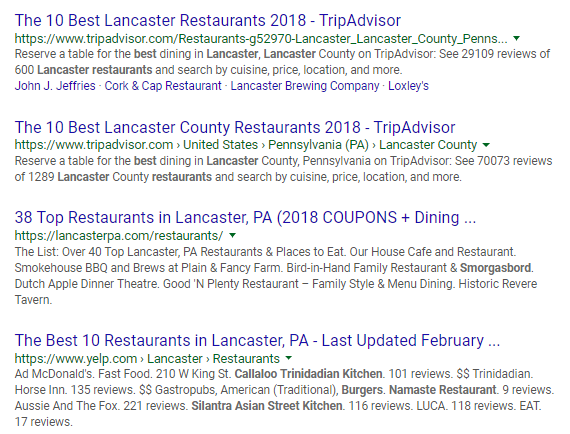
Years ago, SEO may have been little more than keyword stuffing. Today, while keywords and technical SEO are still an important piece of the puzzle, search engines have gotten a lot more sophisticated. Search engines are trying to return the best and most relevant answer, which means they’re looking for the source with the best information. Content is how you provide that relevant answer.

For example, try Googling “best restaurants in Lancaster, PA.” The top organic results aren’t restaurants. They’re all articles or lists of popular restaurants in the area. Search engines know that content about the top restaurants is more useful to the searcher than simply listing the restaurant websites in the search results.

SEO Content SERP example.png

SEO and content are inextricably linked today. You can’t do SEO without quality content to optimize, and it’s a waste of time for you to create great content that no one can find. Whenever you’re looking at SEO services, make sure you’re having a conversation about content.

Good SEO services cost more than $95.87

If a deal looks too good to be true, it probably is – and that remains true here. Scam SEO companies will always claim that they do better for less, but the simple truth is that good SEO services don’t come cheap.

According to a survey from Rand Fishkin of Moz, SEO agencies reported monthly billings ranging anywhere from $500-10,000/month per client. Small or medium size businesses would likely fall closer to $500-2500/month.

Regardless, the $95.87 on the fake invoice is suspiciously low. Likely, that would only pay for an hour or so of SEO work. Think there’s an SEO company out there that can do keyword research and write, publish, and promote optimized content that will improve your search traffic in an hour? Me neither.

When in doubt, ask!

If you’re working with or considering working with an SEO company, and you have any doubts about their services, don’t be afraid to ask questions. Ask the company to explain their service offerings, and get second opinions from other SEO experts. We’re always happy to answer questions and/or assist with your SEO service needs, plus you can post questions on active SEO chat forums like Moz Q&A.

Read more

Categories SEO

What the Super Bowl Can Teach Us About Website Design

It feels like déjà vu … 13 years ago, the Philadelphia Eagles faced off against the New England Patriots in the Super Bowl. Seems very familiar. But even though Bill Belichick and Tom Brady are still around, many other things have changed since 2005 (besides the outcome). Website design is one of them.

2005 may not seem like that long ago, but when you look at web designs from the last decade, you’ll see the difference. Let’s take a look back at what Super Bowl hype looked like in 2005 vs. today.

NFL.com

2005

NFL.com - Feb2005.png

The first thing you probably notice about this site is text. Lots and lots of text. There are so many headlines and links on this page, you wouldn’t know where to click. The three column layout, which was popular at the time, crams the page full of information, making it feel crowded and claustrophobic. Even worse, most of the text is the same size, so there’s no visual heirarchy to tell your eyes where to look.

The result is that despite being mere days away from the Super Bowl, the graphic and story about the game get lost on the page.

2018

NFL.com - Feb2018.png

Take a look at the difference in 2018, just before the big game. Your eyes are immediately drawn to the hero image, which clearly highlights the two teams. You can practically feel the tension between quarterbacks Tom Brady and Nick Foles, adding to the hype for the game. Right below the image is the clear headline: “Who will win Super Bowl LII?” which directs you to the day’s featured article.

Visually, the page breathes more too. There’s plenty of links to keep avid football-followers busy, but most of them live in a clean, organized list on the right-hand sidebar, so they aren’t overwhelming.

Finally, we can’t ignore the Nike shoes all over the page. Like it or not, digital marketing is a fact of life today, and most major website designs are full of ads. It’s no surprise that 87% of people say there are more ads than two years ago. Certainly they’ve gotten bolder since 2005.

>>Related Article: 13 Scary Advertising Statistics You Need to Know

Takeaways:

  • Use bold, high quality imagery with your website design to help tell your story and draw attention to important features
  • Create a visual hierarchy on your page with open space and larger font sizes, so users know where to look

Superbowl.com

2005

Superbowl.com - Feb2005.png

The NFL’s dedicated Super Bowl site from 2005 suffers from many of the same issues as their main site. Once again, it’s overcrowded, making it hard for users to decide what they should do next. The main image does at least draw your attention toward a main article, but is that what most visitors are looking for?

The big question a Super Bowl site should answer is: “when is the Super Bowl?” Only at the very top of the page do they mention the date of the event, and the actual time is nowhere to be found.

At least one thing hasn’t changed since 2005: Pepsi remains the ubiquitous sponsor.

2018

Superbowl.com - Feb2018.png

Now compare the 2018 Super Bowl website design. Stark contrast, right? Above the fold, you see only a single image and clear call-to-action: “Experience Super Bowl.com.” The site makes it unmistakably clear what they want you to do next.

They also answer the most important questions most visitors have right off the bat. The date, time and location of the game are right in the middle of the screen. They even include a fun countdown timer to add to the hype (and help the people who can never remember what day it is). Even more, the first two links in the navigation bar are “Event Info” and “Ways to Watch.” The NFL’s goal is to get more people watching the Super Bowl, and their site is clearly geared toward that goal.

Takeaways:

  • Think about your goals for your website design and create clear calls to action that drive the desired action
  • Think about the common questions you’re customers are asking, and what they’re looking for when they come to your site. Make sure you answer those burning questions right away

Pepsi.com

2005

Pepsi Flash - 2005.png

Since Pepsi and the NFL so often go together, we thought we’d take a look at their old website. Unfortunately, the archives couldn’t provide much. Pepsi’s old website design used Flash, a common technology at the time for displaying animated or moving elements. Flash suffers from many problems including security issues and slow performance, so it is obsolete at this point.

Unfortunately, some current sites still use Flash technology, despite the fact that it is not supported by many devices and browsers. If your site still uses Flash, it’s time for an update.

2018

Pepsi - 2018.png

Pepsi’s current website design still makes great use of motion (just without Flash). The video playing on the homepage highlights the product and makes you thirsty. They keep the page very clean, with a simple navigation menu and an invitation to scroll further down the page.

Pepsi - 2018 - Halftime.png

As the Super Bowl halftime sponsor, Pepsi included this behind-the-scenes peek further down their homepage. Justin Timberlake has nothing to do with selling soft drinks, but Pepsi knows that fans love getting a glimpse behind the curtain. They’re glad to attach their brand to the halftime spectacle.

Takeaways:

  • Harness the power of video and motion on your website design to add interest and excitement, just avoid using outdated technologies like Flash
  • Enhance your brand by offering valuable content that your audience will love

Papajohns.com

2005

Papa Johns - 2005.png

What else goes perfectly with the Super Bowl besides Pepsi? Try pizza and wings.

The Papa John’s of 2005 is actually remarkably similar to its current self. The classic red logo and pictures of the latest game-day snacks dominate the page. Even back then, they clearly knew the power of online ordering. Their calls to action consistently direct customers to order online.

Unfortunately, Papa John’s didn’t take advantage of the Super Bowl hype. This screenshot is taken just before Super Bowl Sunday, yet there’s no mention of game-day discounts or specials. Instead, we just see movie-related offers in the right sidebar that look especially out of place amidst  the (admittedly Christmas-y) red and green theme of the rest of the site.

2018

Papa Johns - 2018.png

Papa John’s modern website design captures the Super Bowl spirit with a prominent promo code and football-themed background. They even repeat the CTA for free Super Bowl pizza below the fold. They’ve also replaced the long-winded explanation of their wings with short, punchy headlines that are easy to take in at a glance.

Despite a similar color scheme to their 2005 site, Papa John’s has also made plenty of visual tweaks to make the site more appealing. They toned down the Christmas theme, softening their harsh green into a more blueish-green. On their headlines, they also transitioned to a non-serif font, which looks more modern.

Takeaways:

  • Be aware of current events . With the world as connected and social as it is, relevant, timely marketing is key
  • Craft bold headlines. People lose interest fast, so they need concise information, not long-winded descriptions
  • Consider your brand logo, colors, fonts, and styling carefully, and make sure they stay up-to-date with modern web design trends

The next time the Eagles and the Patriots face off, we’ll have to compare websites again. In the meantime, congratulations to the Eagles, and if you missed them, don’t forget to check out the amazing commercials!

If you are finding that your business is in need of a website redesign or just web design services in general, give our web design company a call or send us an email today.

Start A Conversation

Read more

9 Quick Fixes to Improve Your Facebook Business Page

Your Facebook Business Page is like a second outpost for your business online. Nearly all of your customers will visit your website at some point before they buy from you. More and more are visiting your company Facebook page as well to learn more about your business. Make sure you’re creating the best impression possible with a strong Business Page.
Here are 9 quick tips that can help you boost the impact of your Facebook Business Page:

1. Don’t Use a Personal Page for Your Business

Even if you’re the face of your business, don’t try to substitute a personal Facebook profile for a real Business Page. First of all, you probably don’t want to mix your business communications with the pictures from your family vacation. Furthermore, personal profiles lack Facebook’s arsenal of business tools like page management, scheduling, advertising opportunities, and analytics. Business Pages are also public by nature, so your customers don’t have to “friend” you before they can interact with you.

Keep in mind that you do need to have a personal profile associated with your Business Page as an admin. In other words, Facebook needs to know that there is a real person managing your business account. However, your customers will not be able to tell that you are an admin or see any of your personal information.

If you need help getting started, here’s a simple guide on how to create a Facebook Business Page.

2. Add a Profile Photo People Will Recognize

Your profile picture displays on the top left of your Business Page as well as on all of your posts and comments. Essentially, it’s everywhere. So you want to make sure that it’s something your audience will recognize. In most cases, you’ll probably want to use your business’s logo, mascot or something similar.

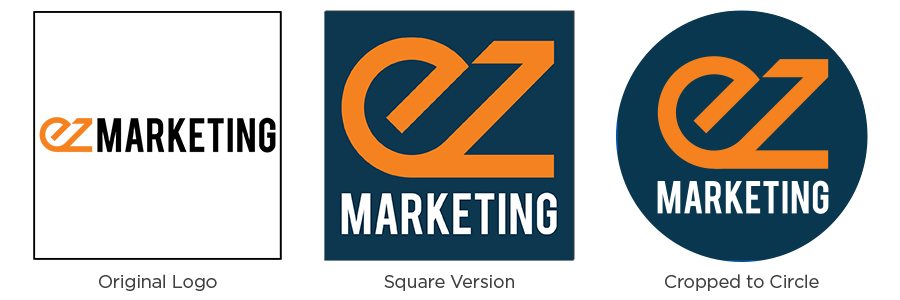
Currently, profile pictures display at 170×170 pixels on desktop and 128×128 pixels on mobile. That’s not big to start with, but it gets even smaller on posts and comments. A square image works best, but remember, Facebook will crop it to a circle on posts and comments. If your logo is long horizontally (like ours is), you may want to adapt it, so it’s legible on Facebook.

Logo Comparison_blue

Note: Facebook changes photo dimensions all the time. Double-check their help section for the latest info.

3. Create Your Custom URL

When you’re sharing your Facebook page address with your customers, which would you rather give them:

     facebook.com/pages/yourcompany/2960133610752

or

     facebook.com/yourcompany

A custom URL, or vanity URL, enhances the branding and professionalism of your business page. Plus, it’s a lot easier to share.

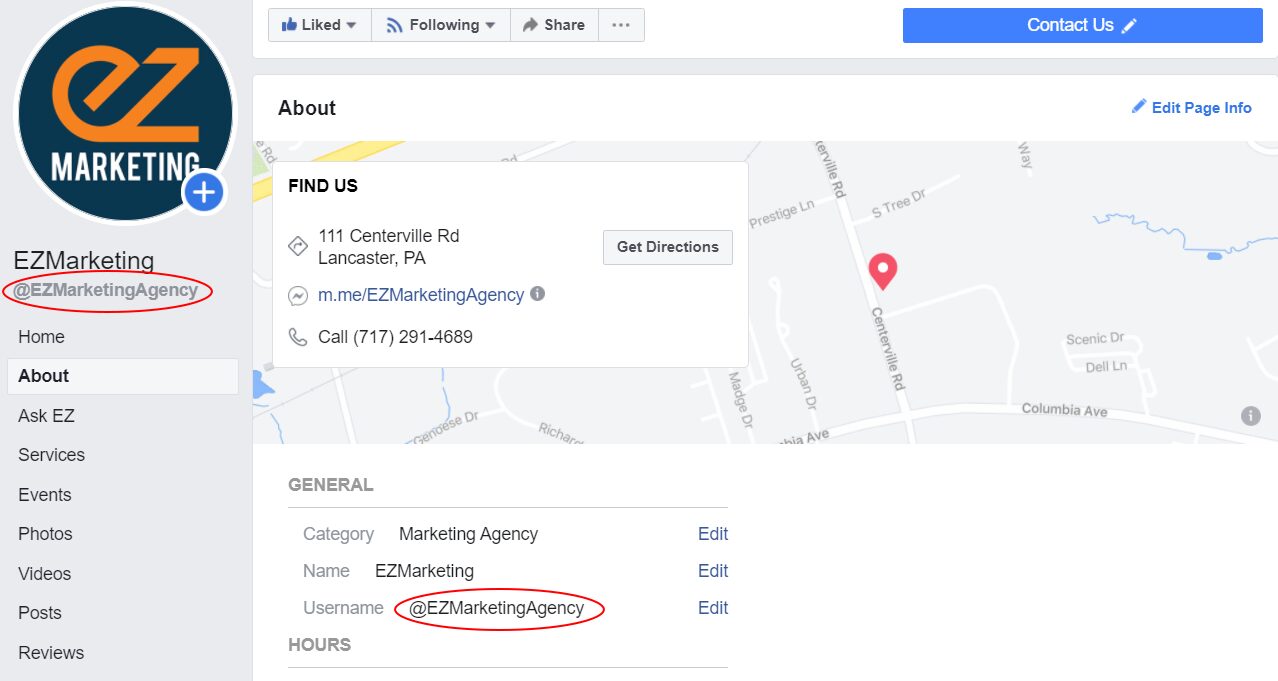
To change the URL for your business, you must create a username for your Page. On your Business Page, go to About and look for Username to set or change your page’s username. Try to keep it as close as possible to your business’s name without duplicating a username someone else is already using.

Facebook-username

4. Create an Attention-Grabbing Cover Image

Dominating the top of your Facebook page, your cover image is one of your simplest tools to make your Business Page stand out. Choose high-quality imagery that makes an impact with your audience. Generally something with white space that’s not too busy works best. Use text judiciously to add emphasis and drive engagement, without filling your cover with words. You can even use your cover photo to emphasize the buttons directly below, encouraging users to follow your page or contact you.

This cover photo from Good Goat Milk Co. has a nice mix of imagery and text that highlights the benefits of the product and naturally encourages people to click on the Shop Now call to action.

Facebook automatically crops your larger desktop cover photo when viewed on mobile devices. The problem is that they chop off a good portion of the left and right sides. So your cover photo may look great on your computer, but if you have a key element or text too close to the edges, it may get cut off on mobile.

Here are two easy ways to avoid this:

  1. Keep any text closer to the center and away from the left and right edges of the photo
  2. Design your image to be taller than the recommended 820×312 size. (One source recommends 820×461 pixels). You can position your desktop cover photo to center the image. Then it will display without cutting anything off on mobile.

5. Add a Call to Action Button

As we mentioned before, one of the great things you can do with your cover photo is draw attention to the buttons immediately below. One of those buttons is a custom call to action so you can tell your Facebook visitors what you want them to do next. That can be visiting your website, sending you a chat message, booking an appointment, making a purchase or donation, and much more.

To add a button, log in to your Business Page and look for +Add a Button below your cover Photo. Select which button type you want and follow the instructions to add it to your page.

6. Complete Your About Section

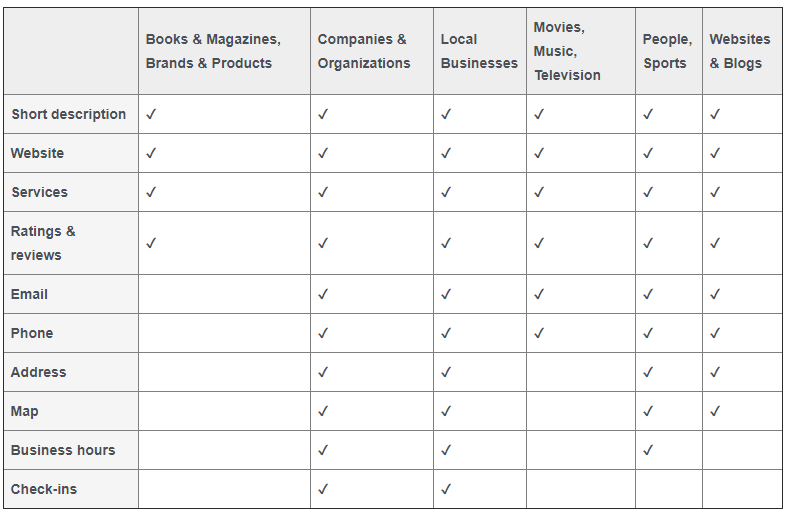
Like your website, many people visit your Facebook page looking for information about your business. Create the best impression possible by completing the About section of your Business profile. Depending on what category of Business Page you created, different features will be available.
In general, make sure you describe what your business is all about and include contact information so people can reach you easily. If you have a physical location, include a map and business hours too.

7. Customize and Prioritize Your Page Tabs

Your Facebook Business Page is a highly customizable tool that can be extremely powerful.

All Business Pages start with standard tabs like About, Photos and Posts, but you can add custom tabs to create an even more engaging experience. You can run contests or polls, provide special offers, capture leads, and much more. Facebook also integrates with a ton of 3rd party apps, which provide even more options – like all these useful Facebook Page apps.

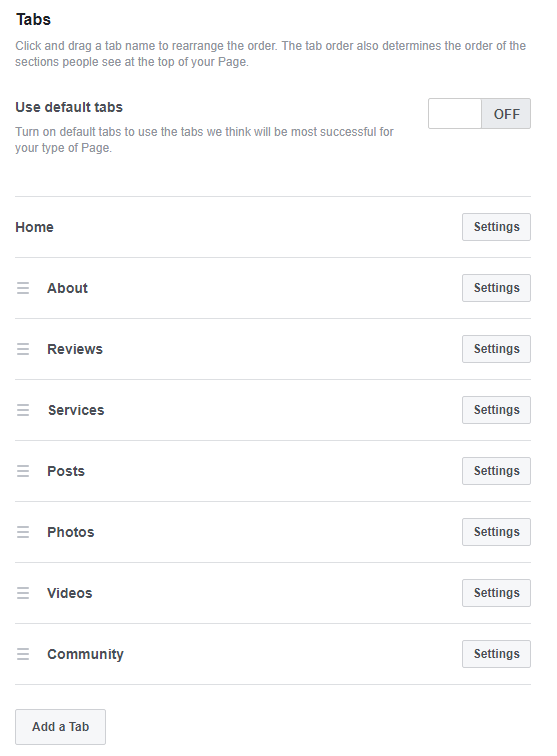
You can also re-arrange tabs to highlight your most important content first. All your tabs will display on the left-hand sidebar of your page, but the tab order determines the order of sections in your Page’s timeline. Do you want your posts to show first, or do you want to highlight your reviews, or maybe your videos? It’s completely up to you.

To manage your tabs, click Settings in the upper-right of your page manager. Then click Edit Page. You’ll see a list of all the tabs on your page. From here, you can rearrange the existing tabs or add new ones.

8. Pin Important Posts

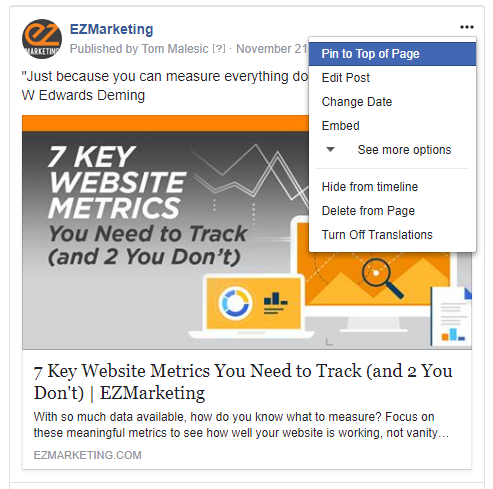
Another way to draw attention to important information is to pin your key posts to the top of your page. That way you can keep critical announcements, current offers, and special events highlighted at the top of your timeline. Just make sure to keep your pinned content current and swap it out regularly.

To pin a post, click the three dots in the upper right corner of the post and click “Pin to Top of Page.”

9. Respond to Messages

Messaging and live chat are becoming an increasingly popular way for your customers to reach your business. Over 60 million businesses use Facebook Messenger, sending more than 2 billion messages back and forth with users each month.
Despite this, many businesses fail to respond to customer inquiries on their Facebook pages – or at least, they don’t respond quickly enough. Think of Facebook Messenger as an alternative to phone-based customer support. When someone calls into your business, first and foremost, they expect someone to answer. Second, they expect to be able to get help and speak to someone quickly. They don’t want to get stuck on hold forever.

Treat messaging the same way. Monitor your Facebook pages and respond to messages consistently and promptly. If you reply to 90% of messages within 15 minutes, you can even earn a “Very responsive” badge for your Page. This lets your visitors know that they can expect great service from your page and makes them more likely to message you.

To help with this, Facebook provides automated response assistance, which can provide greeting messages, instant replies and reminders. Within your Page Manager, go to Settings –> Messaging to change these options. You can also download the Pages Manager App on your phone to get mobile notifications when new messages come in.

For more advanced automation, consider adding a chatbot to your Business Page. Messaging platforms like MobileMonkey allow you to manage chat from your website, Facebook, Instagram, and more—all in one place. MobileMonkey also has a great article with even more Facebook business tips.

Your Turn

Even if you already have a great Facebook Business Page, it’s always worth a second look. Facebook is constantly changing and adding features, so it’s important to review your Facebook Page regularly. Have any other tips to share? Leave us a comment on our Facebook page!

If you find you just don’t have the time to manage your Facebook business page, keep in mind we offer Facebook marketing services to help simplify your life.

Start A Conversation 

Read more

How the Grinch Stole Business

As a fun holiday break from our typical posts, we’d like to share our own rendition of a classic holiday favorite, courtesy of our resident poet laureate, Bill Hager.

Wishing you all Happy Holidays and a very Happy New Year!

Your EZMarketing Team

Read more